
Avaya Phone Headset Compatibility Guide
Complete guide to finding and connecting the perfect headset for your Avaya telephone. Learn about compatibility, equipment requirements, and setup procedures.
About Avaya Headset Compatibility
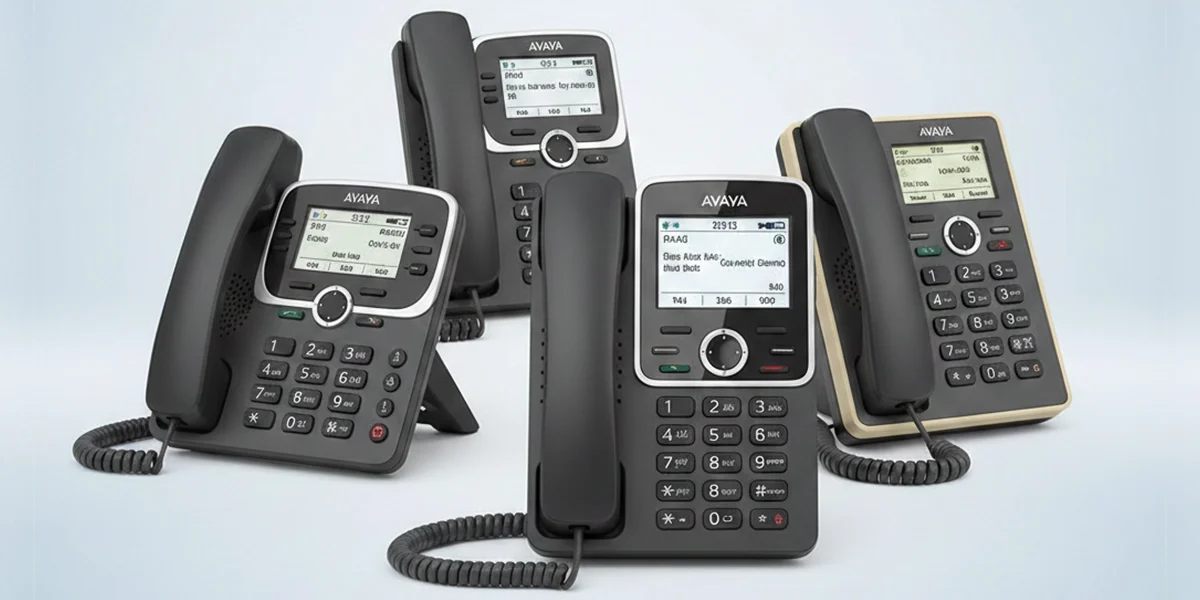
Avaya (formerly known as AT&T and Lucent) is a global tech company that provides unified communication, cloud communication, and contact center solutions. This tech company has done an excellent job in the integration of telephone headsets into their standard Avaya phones and newer VoIP softphones.
Numerous headsets can be compatible with the Avaya telephones, but which headset performs the best matters. It's important to find out the right amplifier and direct-connect cable that makes a headset work properly with the telephones.
Key Takeaways
- Find the right amplifier and direct-connect cable for proper headset functionality
- Understand compatibility requirements for your specific Avaya phone model
- Learn the difference between corded and wireless headset solutions
- Master remote answer and hang-up capabilities for hands-free operation
Comprehensive Guide
Simplified sections covering everything from compatibility charts to setup procedures, designed for first-time buyers to frequent users.
Easy to Navigate
Organized into 5 distinct sections with clear explanations and visual aids to help you find exactly what you need.
Verified Information
Equipment compatibility information provided by manufacturers, ensuring accuracy and reliability for your purchase decisions.
Guide Navigation
Avaya Headset Compatibility Chart
Find your Avaya phone model and discover compatible Poly corded and wireless headsets along with required equipment
How to Use This Chart
- Find your phone model in column 1
- Decide whether you want a corded or wireless headset solution
- Check the compatible equipment needed for your chosen connection type
- Reference the specific cable or amplifier requirements (H-Series)
⚠️ Important Disclaimer
The information is solely provided by the manufacturers and is subject to change from time to time without any prior notice. We are not responsible for any errors or omissions due to these changes.
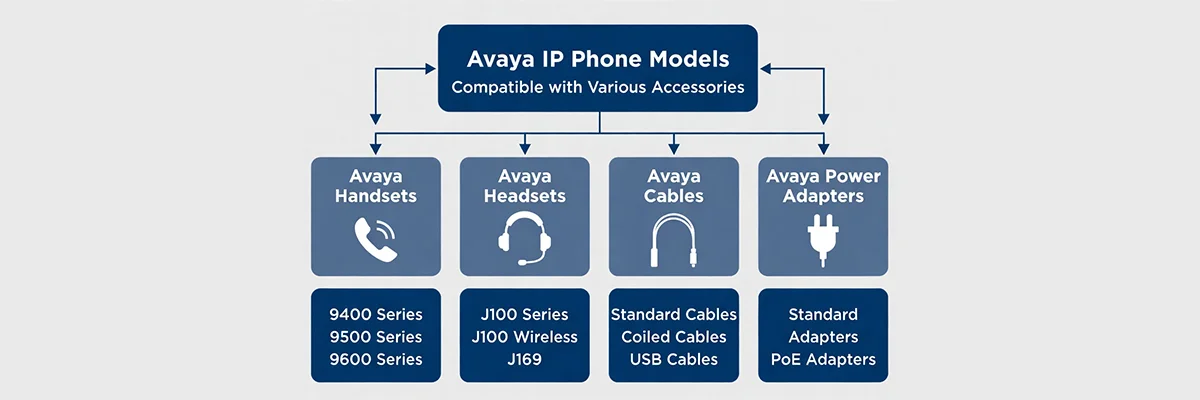
| Avaya Model | Poly Corded | Cable or Amp (H-Series) | Poly Wireless Headsets | Poly EHS Cable / Lifter |
|---|---|---|---|---|
| Avaya 1120e | Poly QD Series | A10 Cable or MDA524 | Poly Desk phone series | APU-72 or APU-76 |
| Avaya 1140e | Poly QD Series | A10 Cable or MDA524 | Poly Desk phone series or Bluetooth headsets | APU-72 |
| Avaya 1150e | Poly QD Series | A10 Cable or MDA524 | Poly Desk phone series | APU-72 or APU-76 |
| Avaya 1200 Series | Poly QD Series | A10 Cable or MDA524 | Poly Desk phone series | Poly HL10 |
| Avaya 1403 | Poly QD Series | MDA524 | Poly Desk phone series | Poly HL10 |
| Avaya 1408 | Poly QD Series | HIC Cable or MDA524 | Poly Desk phone series | APV-63 or Poly HL10 |
| Avaya 1416 | Poly QD Series | HIC Cable or MDA524 | Poly Desk phone series | APV-63 or Poly HL10 |
| Avaya 1603 | Poly QD Series | MDA524 | Poly Desk phone series | Poly HL10 |
| Avaya 1603SW IP | Poly QD Series | MDA524 | Poly Desk phone series | Poly HL10 |
| Avaya 1608 IP | Poly QD Series | HIS Cable or MDA524 | Poly Desk phone series | APV 63 or Poly HL10 |
| Avaya 1616 IP | Poly QD Series | HIS Cable or MDA524 | Poly Desk phone series | APV 63 or Poly HL10 |
| Avaya 16CC | NONE | NONE | NONE | NONE |
| Avaya 2402 | Poly QD Series | MDA524 | Poly Desk phone series | Poly HL10 |
| Avaya 2410 | Poly QD Series | HIC Cable or MDA524 | Poly Desk phone series | APV 63 or Poly HL10 |
| Avaya 2420 | Poly QD Series | HIC Cable or MDA524 | Poly Desk phone series | APV 66 or Poly HL10 |
| Avaya 2500 Series | Poly QD Series | MDA524 | Poly Desk phone series | NONE |
| Avaya 3631 | NONE | NONE | NONE | NONE |
| Avaya 3901 | Poly QD Series | MDA524 | Poly Desk phone series | NONE |
| Avaya 3902 | Poly QD Series | MDA524 | Poly Desk phone series | NONE |
| Avaya 3903 | Poly QD Series | A10 Cable or MDA524 | Poly Desk phone series | NONE |
| Avaya 3904 | Poly QD Series | A10 Cable or MDA524 | Poly Desk phone series | NONE |
| Avaya 3905 | Poly QD Series | A10 Cable or MDA524 | Poly Desk phone series | NONE |
| Avaya 4412D | Poly QD Series | HIC Cable or MDA524 | Poly Desk phone series | Poly HL10 |
| Avaya 4424D+ | Poly QD Series | HIC Cable or MDA524 | Poly Desk phone series | Poly HL10 |
| Avaya 4601 | Poly QD Series | MDA524 | Poly Desk phone series | Poly HL10 |
| Avaya 4602 | Poly QD Series | MDA524 | Poly Desk phone series | Poly HL10 |
| Avaya 4606 | Poly QD Series | HIC Cable or MDA524 | Poly Desk phone series | Poly HL10 |
| Avaya 4610 | Poly QD Series | HIC Cable or MDA524 | Poly Desk phone series | APV-66 |
| Avaya 4610SW | Poly QD Series | HIC Cable or MDA524 | Poly Desk phone series | APV-66 |
| Avaya 4612 | Poly QD Series | HIC Cable or MDA524 | Poly Desk phone series | Poly HL10 |
| Avaya 4620 | Poly QD Series | HIC Cable or MDA524 | Poly Desk phone series | APV-66 |
| Avaya 4620SW | Poly QD Series | HIC Cable or MDA524 | Poly Desk phone series | APV-66 |
| Avaya 4621 | Poly QD Series | HIC Cable or MDA524 | Poly Desk phone series | APV-66 |
| Avaya 4621SW | Poly QD Series | HIC Cable or MDA524 | Poly Desk phone series | APV-66 |
| Avaya 4621SWIP | Poly QD Series | HIC Cable or MDA524 | Poly Desk phone series | APV-66 |
| Avaya 4622 | Poly QD Series | HIC Cable or MDA524 | Poly Desk phone series | APV-66 |
| Avaya 4622SW | Poly QD Series | HIC Cable or MDA524 | Poly Desk phone series | APV-66 |
| Avaya 4624 | Poly QD Series | HIC Cable or MDA524 | Poly Desk phone series | Poly HL10 |
| Avaya 4625 | Poly QD Series | HIC Cable or MDA524 | Poly Desk phone series | APV-66 |
| Avaya 4625SW | Poly QD Series | HIC Cable or MDA524 | Poly Desk phone series | APV-66 |
| Avaya 4630 | Poly QD Series | HIC Cable or MDA524 | Poly Desk phone series | APV-66 |
| Avaya 4630SW | Poly QD Series | HIC Cable or MDA524 | Poly Desk phone series | APV-66 |
| Avaya 5402 | Poly QD Series | MDA524 | Poly Desk phone series | Poly HL10 |
| Avaya 5410 | Poly QD Series | HIC Cable or MDA524 | Poly Desk phone series | APV-63 |
| Avaya 5420 | Poly QD Series | HIC Cable or MDA524 | Poly Desk phone series | APV-66 |
| Avaya 5601 | Poly QD Series | MDA524 | Poly Desk phone series | Poly HL10 |
| Avaya 5602 | Poly QD Series | MDA524 | Poly Desk phone series | Poly HL10 |
| Avaya 5610 | Poly QD Series | HIC Cable or MDA524 | Poly Desk phone series | APV-66 |
| Avaya 5620 | Poly QD Series | HIC Cable or MDA524 | Poly Desk phone series | APV-66 |
| Avaya 5621 | Poly QD Series | HIC Cable or MDA524 | Poly Desk phone series | APV-66 |
| Avaya 6211 | Poly QD Series | MDA524 | Poly Desk phone series | Poly HL10 |
| Avaya 6219 | Poly QD Series | MDA524 | Poly Desk phone series | Poly HL10 |
| Avaya 6221 | Poly QD Series | MDA524 | Poly Desk phone series | Poly HL10 |
| Avaya 6402 | Poly QD Series | MDA524 | Poly Desk phone series | Poly HL10 |
| Avaya 6402D | Poly QD Series | MDA524 | Poly Desk phone series | Poly HL10 |
| Avaya 6408+ | Poly QD Series | MDA524 | Poly Desk phone series | Poly HL10 |
| Avaya 6408D+ | Poly QD Series | MDA524 | Poly Desk phone series | Poly HL10 |
| Avaya 6416D+ | Poly QD Series | MDA524 | Poly Desk phone series | Poly HL10 |
| Avaya 6416D+M | Poly QD Series | HIC Cable or MDA524 | Poly Desk phone series | APV-63 or Poly HL10 |
| Avaya 6242D+ | Poly QD Series | MDA524 | Poly Desk phone series | Poly HL10 |
| Avaya 6242D+M | Poly QD Series | HIC Cable or MDA524 | Poly Desk phone series | APV-63 or Poly HL10 |
| Avaya 7303 | Poly QD Series | A10 Cable or MDA524 | Poly Desk phone series | Poly HL10 |
| Avaya 7305 | Poly QD Series | A10 Cable or MDA524 | Poly Desk phone series | Poly HL10 |
| Avaya 7308 | Poly QD Series | A10 Cable or MDA524 | Poly Desk phone series | Poly HL10 |
| Avaya 7311 | Poly QD Series | A10 Cable or MDA524 | Poly Desk phone series | Poly HL10 |
| Avaya 7313 | Poly QD Series | A10 Cable or MDA524 | Poly Desk phone series | Poly HL10 |
| Avaya 7314 | Poly QD Series | A10 Cable or MDA524 | Poly Desk phone series | Poly HL10 |
| Avaya 7316 | Poly QD Series | A10 Cable or MDA524 | Poly Desk phone series | Poly HL10 |
| Avaya 7316E | Poly QD Series | A10 Cable or MDA524 | Poly Desk phone series | Poly HL10 |
| Avaya 7317 | Poly QD Series | A10 Cable or MDA524 | Poly Desk phone series | Poly HL10 |
| Avaya 7318 | Poly QD Series | A10 Cable or MDA524 | Poly Desk phone series | Poly HL10 |
| Avaya 7400 Series | Poly QD Series | MDA524 | Poly Desk phone series | Poly HL10 |
| Avaya 8100 Series | Poly QD Series | MDA524 | Poly Desk phone series | Poly HL10 |
| Avaya 8400 Series | Poly QD Series | MDA524 | Poly Desk phone series | Poly HL10 |
| Avaya 8520 ISDN | Poly QD Series | MDA524 | Poly Desk phone series | Poly HL10 |
| Avaya 9330-AV | Poly QD Series | U10P cable or MDA524 | Poly Desk phone series | Poly HL10 |
| Avaya 9404 | Poly QD Series | HIC Cable or MDA524 | Poly Desk phone series | APV-63 |
| Avaya 9406 | Poly QD Series | HIC Cable or MDA524 | Poly Desk phone series | APV-63 |
| Avaya 9408 | Poly QD Series | HIC Cable or MDA524 | Poly Desk phone series | APV-63 |
| Avaya 9504 | Poly QD Series | HIC Cable or MDA524 | Poly Desk phone series | APV-63 |
| Avaya 9508 | Poly QD Series | HIC Cable or MDA524 | Poly Desk phone series | APV-63 |
| Avaya 9601 | Poly QD Series | HIS Cable or MDA524 | Poly Desk phone series, Bluetooth | Poly HL10 |
| Avaya 9608 | Poly QD Series | HIS Cable or MDA524 | Poly Desk phone series, Bluetooth | APV 63 or Poly HL10 |
| Avaya 9610 | Poly QD Series | HIS Cable or MDA524 | Poly Desk phone series, Bluetooth | Poly HL10 |
| Avaya 9611 | Poly QD Series | HIS Cable or MDA524 | Poly Desk phone series, Bluetooth | APV 63 or Poly HL10 |
| Avaya 9611G | Poly QD Series | HIS Cable or MDA524 | Poly Desk phone series, Bluetooth | APV 63 or Poly HL10 |
| Avaya 9620 | Poly QD Series | HIS Cable or MDA524 | Poly Desk phone series, Bluetooth | APV 63 or Poly HL10 |
| Avaya 9620C | Poly QD Series | HIS Cable or MDA524 | Poly Desk phone series, Bluetooth | APV 63 or Poly HL10 |
| Avaya 9620L | Poly QD Series | HIS Cable or MDA524 | Poly Desk phone series, Bluetooth | APV 63 or Poly HL10 |
| Avaya 9621 | Poly QD Series | HIS Cable or MDA524 | Poly Desk phone series, Bluetooth | APV 63 or Poly HL10 |
| Avaya 9630 | Poly QD Series | HIS Cable or MDA524 | Poly Desk phone series, Bluetooth | APV 63 or Poly HL10 |
| Avaya 9640 | Poly QD Series | HIS Cable or MDA524 | Poly Desk phone series, Bluetooth | APV 63 or Poly HL10 |
| Avaya 9640G | Poly QD Series | HIS Cable or MDA524 | Poly Desk phone series, Bluetooth | APV 63 or Poly HL10 |
| Avaya 9641 | Poly QD Series | HIS Cable or MDA524 | Poly Desk phone series, Bluetooth | APV 63 or Poly HL10 |
| Avaya 9650 | Poly QD Series | HIS Cable or MDA524 | Poly Desk phone series, Bluetooth | APV 63 or Poly HL10 |
| Avaya 9650C | Poly QD Series | HIS Cable or MDA524 | Poly Desk phone series, Bluetooth | APV 63 or Poly HL10 |
| Avaya 9670 | Poly QD Series | HIS Cable or MDA524 | Poly Desk phone series, Bluetooth | APV 63 or Poly HL10 |
| Avaya BIS10 | Poly QD Series | MDA524 | Poly Desk phone series | Poly HL10 |
| Avaya BIS19 | Poly QD Series | MDA524 | Poly Desk phone series | Poly HL10 |
| Avaya BIS22 | Poly QD Series | MDA524 | Poly Desk phone series | Poly HL10 |
| Avaya BIS34 | Poly QD Series | MDA524 | Poly Desk phone series | Poly HL10 |
| Avaya BIS34D | Poly QD Series | MDA524 | Poly Desk phone series | Poly HL10 |
| Avaya Callmaster V | Poly QD Series | U10 Cable or MDA524 | Poly Desk phone series | NONE |
| Avaya Callmaster VI | Poly QD Series | U10 Cable or MDA524 | Poly Desk phone series | NONE |
| Avaya Console 302D | Poly QD Series | HIC Cable | Poly Desk phone series | NONE |
| Avaya Definity 7506 ISDN | Poly QD Series | MDA524 | Poly Desk phone series | Poly HL10 |
| Avaya J129 | Poly QD Series | HIS Cable or MDA524 | Poly Desk phone series | APV-63 |
| Avaya J139 | Poly QD Series | HIS Cable or MDA524 | Poly Desk phone series | APV-63 |
| Avaya J159 | Poly QD Series | HIS Cable or MDA524 | Poly Desk phone series, Bluetooth | APV-63 |
| Avaya J169 | Poly QD Series | HIS Cable or MDA524 | Poly Desk phone series, Bluetooth | APV-63 |
| Avaya J179 | Poly QD Series | HIS Cable or MDA524 | Poly Desk phone series, Bluetooth | APV-63 |
| Avaya Merlin BIS 10 | Poly QD Series | MDA524 | Poly Desk phone series | Poly HL10 |
| Avaya Merlin BIS 19 | Poly QD Series | MDA524 | Poly Desk phone series | Poly HL10 |
| Avaya Merlin BIS 22 | Poly QD Series | MDA524 | Poly Desk phone series | Poly HL10 |
| Avaya Merlin BIS 34 | Poly QD Series | MDA524 | Poly Desk phone series | Poly HL10 |
| Avaya Merlin BIS 34D | Poly QD Series | MDA524 | Poly Desk phone series | Poly HL10 |
| Avaya Merlin II | Poly QD Series | MDA524 | Poly Desk phone series | Poly HL10 |
| Avaya Merlin Legend MLX 10 | Poly QD Series | MDA524 | Poly Desk phone series | Poly HL10 |
| Avaya Merlin Legend MLX 10D | Poly QD Series | MDA524 | Poly Desk phone series | Poly HL10 |
| Avaya Merlin Legend MLX 16D | Poly QD Series | MDA524 | Poly Desk phone series | Poly HL10 |
| Avaya Merlin Legend MLX 20L | Poly QD Series | MDA524 | Poly Desk phone series | Poly HL10 |
| Avaya Merlin Legend MLX 28D | Poly QD Series | MDA524 | Poly Desk phone series | Poly HL10 |
| Avaya Merlin Magic 4406D+ | Poly QD Series | HIC Cable or MDA524 | Poly Desk phone series | Poly HL10 |
| Avaya Merlin Magic 4412D+ | Poly QD Series | HIC Cable or MDA524 | Poly Desk phone series | Poly HL10 |
| Avaya Merlin Magic 4424LD+ | Poly QD Series | HIC Cable or MDA524 | Poly Desk phone series | Poly HL10 |
| Avaya Partner 12 | Poly QD Series | MDA524 | Poly Desk phone series | Poly HL10 |
| Avaya Partner 12D | Poly QD Series | MDA524 | Poly Desk phone series | Poly HL10 |
| Avaya Partner 18 | Poly QD Series | MDA524 | Poly Desk phone series | Poly HL10 |
| Avaya Partner 18D | Poly QD Series | MDA524 | Poly Desk phone series | Poly HL10 |
| Avaya Partner 34 | Poly QD Series | MDA524 | Poly Desk phone series | Poly HL10 |
| Avaya Partner 34D | Poly QD Series | MDA524 | Poly Desk phone series | Poly HL10 |
| Avaya Partner 6 | Poly QD Series | MDA524 | Poly Desk phone series | Poly HL10 |
| Avaya Partner MLS 12 | Poly QD Series | MDA524 | Poly Desk phone series | Poly HL10 |
| Avaya Partner MLS 12D | Poly QD Series | MDA524 | Poly Desk phone series | Poly HL10 |
| Avaya Partner MLS 18 | Poly QD Series | MDA524 | Poly Desk phone series | Poly HL10 |
| Avaya Partner MLS 18D | Poly QD Series | MDA524 | Poly Desk phone series | Poly HL10 |
| Avaya Partner MLS 34 | Poly QD Series | MDA524 | Poly Desk phone series | Poly HL10 |
| Avaya Partner MLS 34D | Poly QD Series | MDA524 | Poly Desk phone series | Poly HL10 |
| Avaya Partner MLS 6 | Poly QD Series | MDA524 | Poly Desk phone series | Poly HL10 |
► Important Notes
- Note 1: No notification of calls when using Poly HL10 due to unique ringtones
- Note 2: Plug wireless headsets into the handset jack, not the headset jack
- Note 3: EHS compatibility requires firmware release greater than 1.8
- Note 4: HL10 may not suit phones with high angles
- Note 5: Use APV-63 over APV-66 when using a sidecar on 4600/5400 series
- Note 6: Avaya 9600 series uses Bluetooth adapter (700383789 SBTA920A)
- Note 7: J159, J179, and J189 support both Bluetooth and wired headsets
What's Required for a Corded Avaya Headset?
Essential equipment and components needed to set up a commercial-grade corded headset for your Avaya telephone
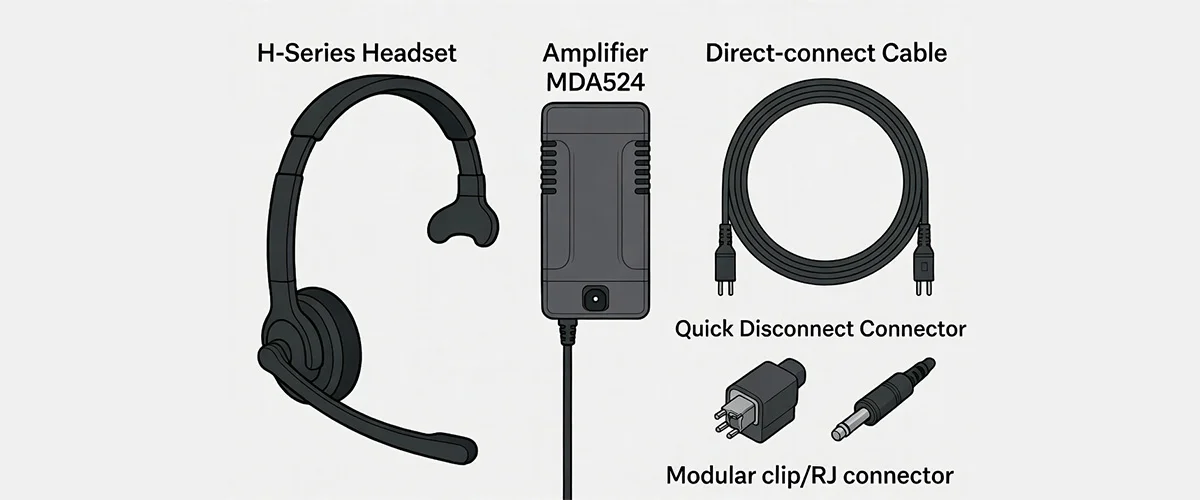
For setting up a commercial-grade corded headset for the Avaya telephones, you will need two items. One item is the amplifier or a direct-connect cable. While the other item is the headset, without which communication is not possible. All these items are joined together for a quick-disconnect (QD) connection.
Headset (H-Series)
The primary communication device with microphone and speaker components
Amplifier or Direct-Connect Cable
Connection interface between headset and telephone
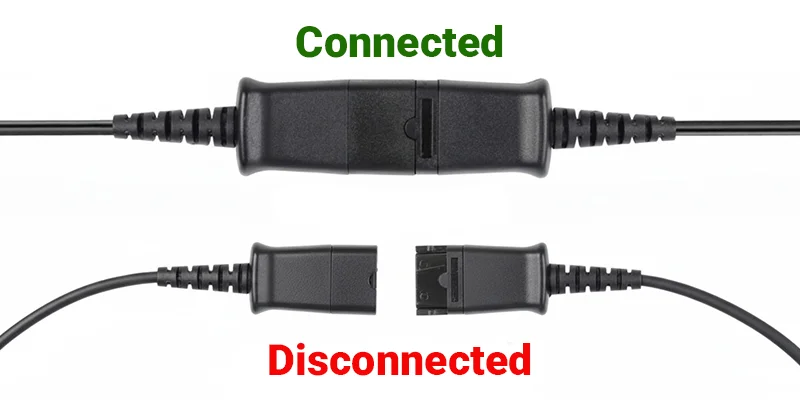
Quick Disconnect (QD)
Allows instant disconnection when walking away from desk
Modular Clip
Terminal connector that plugs into the Avaya telephone
Key Takeaways
- Two main items required: headset and amplifier/direct-connect cable
- Quick Disconnect (QD) allows instant disconnection from telephone
- Modular clip connects to the Avaya telephone port
- All components work together as an integrated system
Quick Disconnect
The quick disconnect is a commercial term that means you can instantly disconnect from the telephone anytime. You need either an amplifier or a direct-connect cable if you want your headset to connect to the telephone. Both come with a modular clip at the terminal side that is plugged into the Avaya telephone.
Amplifier vs. Direct-Connect Cable
MDA524 Amplifier
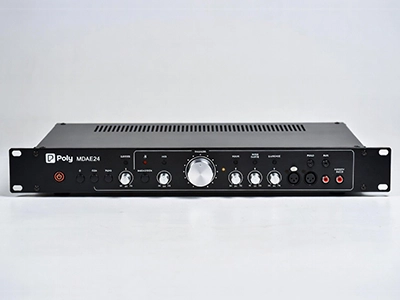
Full Audio Control
Cost: ~$72
Volume Control: Full control over both incoming and outgoing audio levels.
Compatibility: Works with older Avaya phones that require external amplification.
Best For: Soft-spoken users and those needing precise audio adjustment.
Direct-Connect Cable
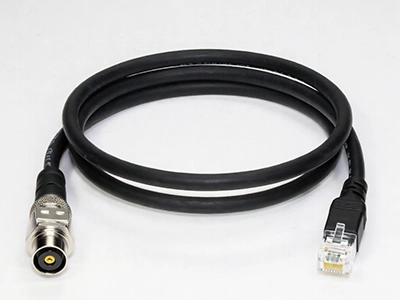
Simple Connection
Cost: ~$28.50
Volume Control: No volume control — phone handles all audio levels.
Compatibility: For newer Avaya phones with built-in amplification.
Best For: Budget-conscious users with modern Avaya phones.
⚠️ Important Consideration
The amplifier gives full control over the outgoing voice volume for the speaker and microphone. The direct cable gives no control over the outgoing voice. Direct-connect cable is not recommended if you are a soft-spoken person on the call.
How Corded Headsets Work with Avaya Telephones
Understanding the setup process for newer Avaya models with direct-connect cables
This section covers how a corded headset works with Avaya telephones. The older Avaya phones used an amplifier for connecting to the headsets, but the newer ones use a direct-connect cable.
Key Takeaways
- Older phones require amplifiers and use the handset port
- Newer phones use direct-connect cables and have dedicated headset ports
- Choose noise-cancelling models for loud environments
- Voice-tube models work best in quieter settings
Setup Using a Direct-Connect Cable
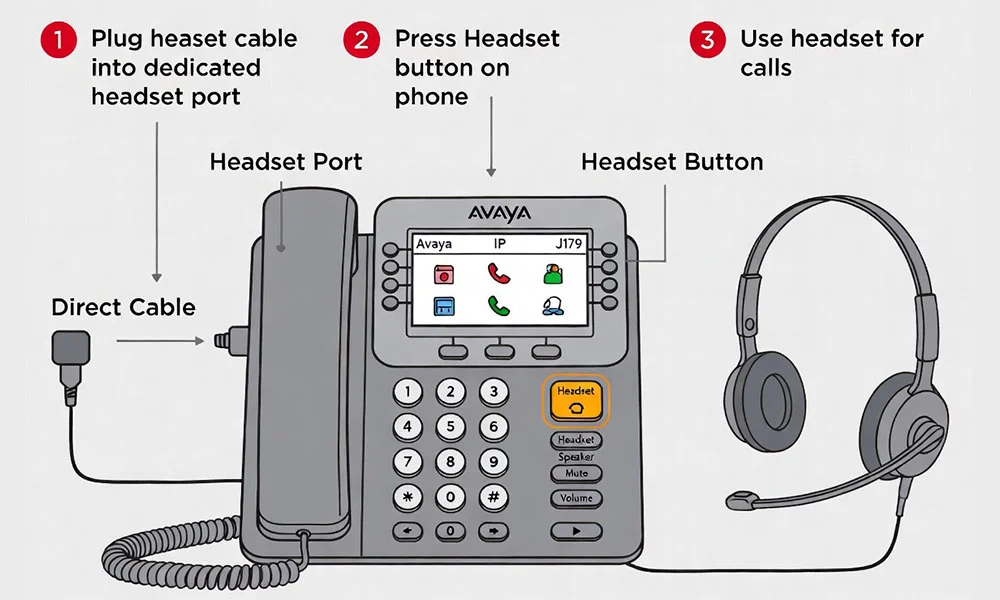
Step 1: Connection
Connect H-series headset to direct-connect cable, then plug into the dedicated headset port on your Avaya phone.
Step 2: Answering Calls
When your Avaya phone rings, press the ringing line button to answer the call through your headset.
Step 3: Ending Calls
Press the dedicated headset button on your Avaya phone to disconnect the call when finished.
● Pro Tip
You can choose a noise-cancelling model for loud environments, while a voice-tube model works best in quieter environments. Explore a wide range of headsets to find the best one for you.
Wireless Headset Options for Avaya Phones
Everything you need to know about going wireless with your Avaya telephone system
Key Takeaways
- Wireless systems are purchased as complete packages with all components
- Base/Charger controls compatibility and manages all functions
- Hand Lifter or EHS cable required for remote answer capability
- Newer wireless models (CS500 & W700 series) need a compatibility setting adjustment
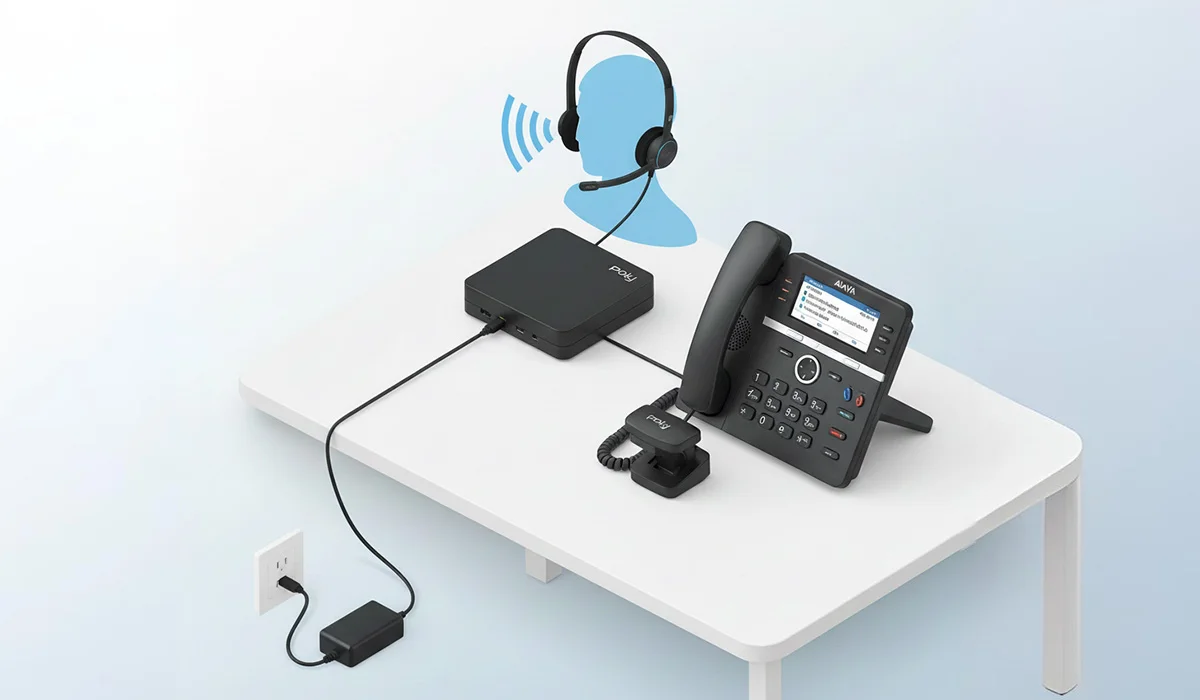
Complete Wireless Headset System Components
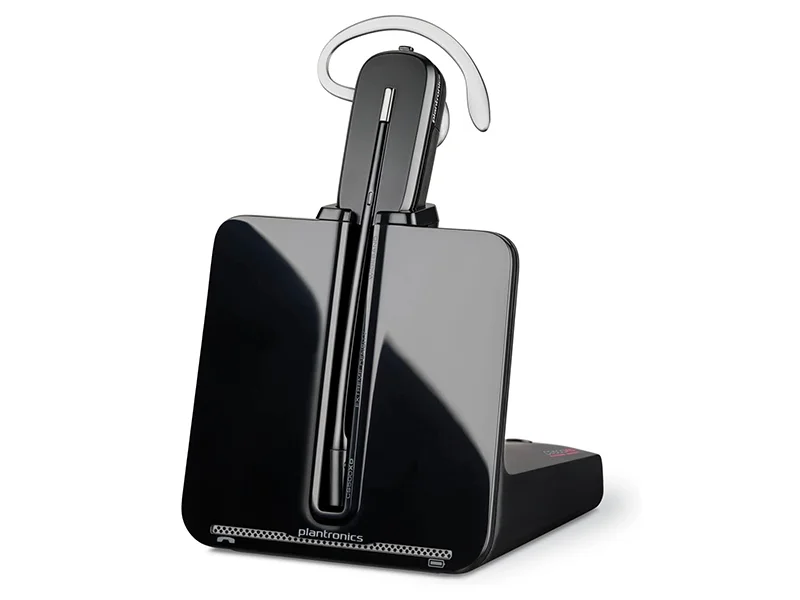
Wireless Headset
The wearable communication device with freedom of movement
Base / Charger
Controls compatibility, charging, volume control, and LED indicators
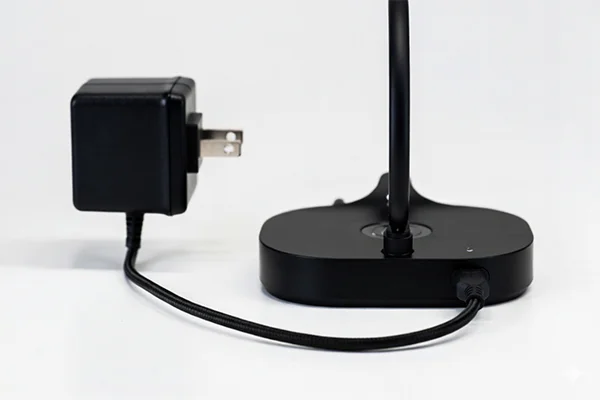
A/C Power Adapter
Power source for the base/charger operations
Hand Lifter or EHS Cable
Optional — required for remote answer and hang-up capability
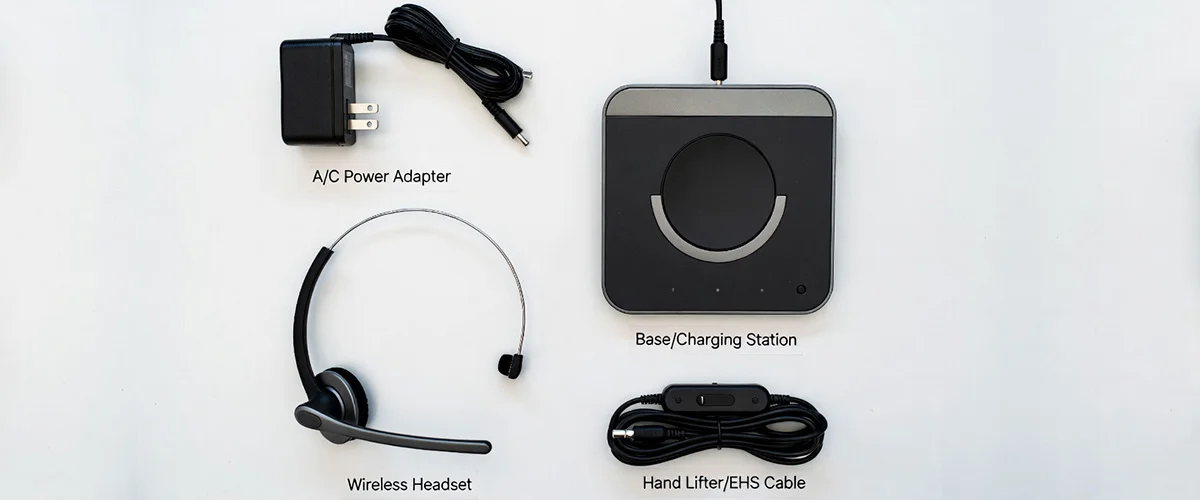
Base / Charger — The Control Center
The base/charger controls compatibility, charges the headset when not in use, and manages microphone and speaker volume. It contains LED indicator lights for power, charging status, and other features.
A/C Power Adapter
This component is the power source for the base/charger, powering all operations of the wireless headset system.
Hand Lifter or Electronic Hook Switch (EHS) Cable
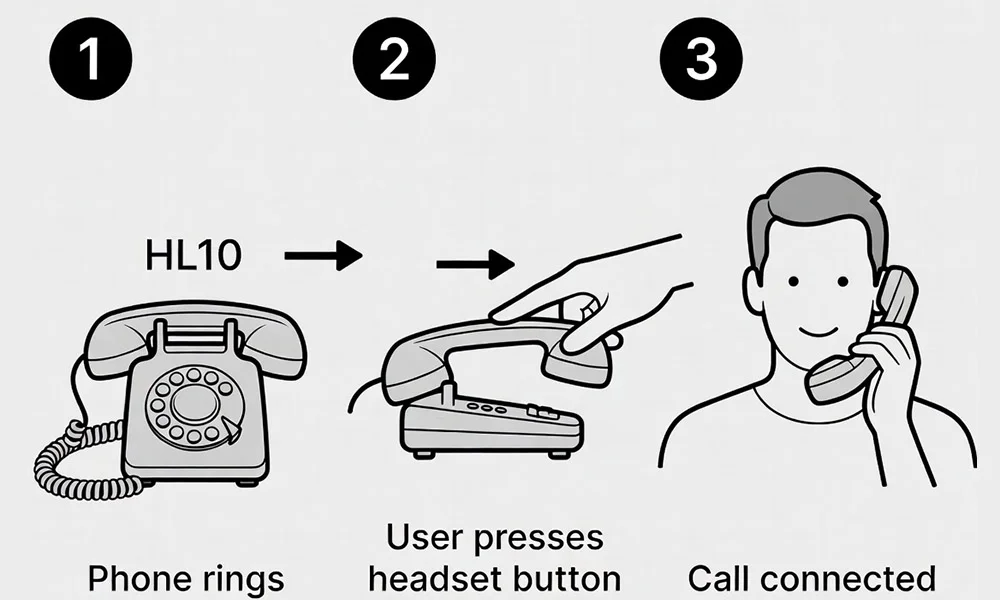
This component is optional, but required if you want to answer or hang up calls remotely without returning to your desk.
Hand Lifter (HL10)
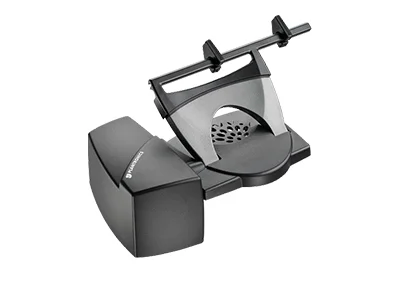
Mechanical Solution
How It Works: Uses a mechanical arm that physically raises and lowers your handset to answer and end calls.
Compatibility: Works with older Avaya models that don't have electronic hookswitch capability.
Benefits: More affordable, no firmware requirements, easy installation.
EHS Cable (APV-63 / APV-66)
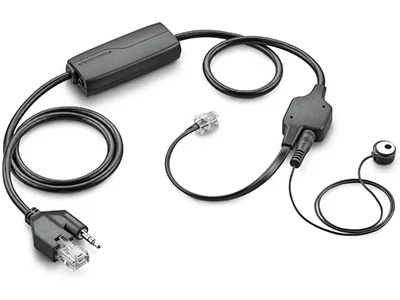
Electronic Solution
How It Works: Electronically establishes calls through a direct connection — no physical movement required.
Compatibility: Works with newer Avaya phones that support electronic hookswitch. Requires firmware 1.8+.
Benefits: Silent operation, no moving parts, faster response, cleaner desk appearance.
⚠️ Important Note for RJ9 Headset Jack
To use Avaya phones with an RJ9 headset jack, the compatibility setting must be adjusted on the base to a different letter. This is necessary if you want to use newer wireless headset models (CS500 & W700 series) with these Avaya telephones.
► Why Choose Wireless?
Wireless headsets provide freedom of movement, allowing you to walk around your office, access files, or collaborate with colleagues while remaining on calls. This increased mobility can significantly improve productivity and reduce the strain of being tethered to your desk.
Commercial-grade wireless headset solutions like the Poly Desk phone series are designed specifically for business environments, offering superior audio quality, longer battery life, and professional features like wideband audio and noise-canceling technology.
Remote Answer and Hang-Up for Wireless Headsets
Learn how to answer and hang up calls wirelessly with Hand Lifter or EHS cable for a truly hands-free experience
Remote Control Features
- Both Hand Lifter and EHS cable enable remote call handling
- Beep sound alerts you to incoming calls in your headset
- Press the Call Control button to answer and hang up
- Increases productivity by eliminating phone tag
- Return to phone needed for dialing and transferring calls

How to Answer Calls
When your phone rings, both the hand lifter and EHS cable will sense the incoming call and generate a beep sound in your headset. To answer, simply press the "Call Control Button" on your headset — even if you're away from your desk.
How to End Calls
Once you've finished talking and want to disconnect, press the Call Control Button again. The call will end immediately, and you'll be ready to take or dial other calls. No need to rush back to your desk to hang up.
● Important Limitation
The hand lifter and EHS cable will help you with taking and hanging up calls remotely, but not more than that. For dialing calls, transferring calls, or performing any other phone operations, you will need to return to the phone and press the relevant buttons.
Hand Lifter vs. EHS Cable
Hand Lifter (HL10)
Mechanical Solution
How It Works: Uses a small mechanical arm that physically lifts and lowers your handset to answer and end calls.
Compatibility: Works with older Avaya models that don't have electronic hookswitch capability.
Benefits: Works with older phones, reliable mechanical operation, visual confirmation when calls are active.
EHS Cable (APV-63 / APV-66)
Electronic Solution
How It Works: Electronically establishes calls through a direct connection to your phone's communication system — no physical movement required.
Compatibility: Works with newer Avaya phones that support electronic hookswitch. Requires firmware 1.8+.
Benefits: Silent operation, no moving parts, faster response time, cleaner desk appearance.
► Time-Saving Benefits
Whether you use a Hand Lifter or an EHS cable, both save you a tremendous amount of time by allowing you to answer calls remotely. A little delay in reaching your desk may convert your calls into an ongoing voicemail while playing phone tag with customers or coworkers.
With remote answer capability, you can answer calls away from your desk instead of rushing towards it. This is especially valuable in busy offices, when you're in meetings nearby, or when you're multitasking across your workspace.
Still Have Questions About Avaya Headset Compatibility?
Our certified headset experts are ready to help you find the perfect headset solution for your Avaya phone. We provide support before, during, and after the sale.
Contact Our Experts