
All You Need to Know about Headsets
History & Technical Revolution of Headsets
Everything You Need to Know About Headsets - From 1800s to Modern Technology
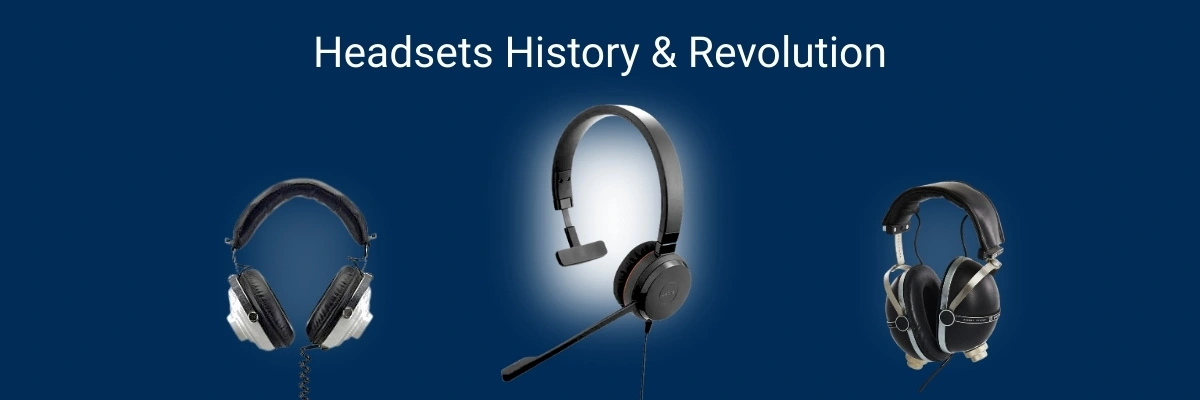
The remarkable evolution of headsets from early telephone operators to modern wireless technology
History & Technical Revolution of Headsets
When we see someone wearing headphones and enjoying their music, it seems normal to us today. But back in the late 1800s, when headphones were first invented by music lovers to satisfy their eardrums with their favorite music, it was a whole new story built to deliver in the next generation. Since then, their innovations and modern aspects have changed the perspective of the digital world and communication.
With the passage of time, our daily life gadgets are getting more and more innovative and equipped with more features and specs. There was a time in the early 2000s when people used to rely on traditional types of phone calls for their businesses. But now people have started using headsets worldwide.
They are used by business professionals who have to attend online meetings and by gamers. If you are a customer support agent who attends calls all day, then you can enjoy hands-free conversations. You can enjoy clear audio, reliable microphones, comfort, and seamless connectivity that are no longer luxuries. They are expectations that get fulfilled.
When we visit markets or a shop that is flooded with different types of headsets, we often get confused. When we look at them, we unexpectedly say: "OOH DANG ITTT!!! There is a lot to pick from. What am I gonna do now? Which headset should I go for broo!? Which feature offers what? And what's the difference between wired, wireless, Bluetooth, and DECT headsets?"
Not to get confused and worried, at FindHeadsets.com we offer every little detail to help you know what you are looking for and what suits your requirement properly.
This ultimate understanding guide is designed to give you a complete understanding of headsets. Their basic definitions and advanced technologies to help you select your best headset without hassle and confusion.
How the Journey of Headsets Started?
By knowing the past, you can judge the present and future. This is what we actually think. So let's understand where headsets came from and how modern headsets are so advanced today.
20th Century Early Beginning
In the early 20th century, headsets were introduced for telephone operators. Those operators faced difficulty in managing the calls with both hands, so they needed a middle solution. This middle solution came out in the form of early single-ear headsets with microphones.
Business and Aviation Use
After their successful entry into the life of call operators, aviators jumped in along with other businesses to try their luck, and voila!! Today whole aviation industry's communication is dependent on modern headsets. They were being used by other businesses as well like:
- Aviation pilot communication
- Military operations
- Radio broadcasting
- Call centers
These businesses were in desperate need of something that could offer them clarity, reliability, and comfort. When they tried headsets, they found their perfect technology partner.

Modern office headsets provide the clarity and comfort that professionals need for all-day use
Modern and Evolutionized Headsets
The modern headsets that we use today are the modern version of all those headsets that were designed before. With the rise of computers and smartphones, internet calling and remote work have increased. Today's advanced headsets perfectly meet the requirements of every user.
They are very lightweight and offer high-quality audio which fulfills every person's both professional and personal needs. Whether you're looking for wireless headsets for mobility or corded headsets for reliability, there's a perfect solution for everyone.
What is Actually a Headset?
So, before moving on to further and longer details, let's understand what headsets actually are. So a headset is an audio device that combines headphones, which are speakers, and a microphone into a single unit. This combo allows a person to listen and speak at the same time.
Headsets are of different styles. They are commonly worn over the head or on one ear, or in both ears. It depends on how you are comfortable and for what purpose you are wearing them.
"Isn't it a great deal by the way? Well, it's just a start, bro. Dessert has yet to be served, so sit tight, my man!!!!"
In the old headphones, people were not able to speak or make two-way communications, but headsets are all set to give you a two-in-one option.
In very simple words, we can say that:
- Headphones = listening only
- Headsets = listening + speaking
This seemingly tiny difference makes the headsets ideal for different practices like:
- Phone calls
- Video conferences
- Online gaming
- Customer support and call centers
- Remote work environments
Time To Learn The Difference Between Headphones and Headsets
Do you know how both of them are different from each other? OHH!! If you don't know, it's perfectly alright. We have got your back. Well, it's not just you; many people get confused.

The key difference: headsets include a built-in microphone for two-way communication
| Features | Headphones | Headsets |
|---|---|---|
| Microphone | Not included | Comes built in |
| Two-way communication | Nopes | Obviously Yes |
| Calls & meetings | A big no | Made for it |
| Gaming use | Sometimes it can be used | Very very common |
| Business use | A very big no | Perfect partner |
So we can say that headsets are specifically designed to give some special advantages to their users to make their work and other activities easy. They offer:
- Voice clarity
- Noise control
- Hands-free communication
For those seeking thebest noise-canceling headset microphones, modern technology has made significant advances in background noise reduction.
A Complete Guide on the Components of Headsets
We discussed what headsets are and how they have innovated over time. Bro! Now it's time to learn how headsets are made and what its components are.
Are you ready to take a deep dive into the ocean of headsets? Then let's jump into it!!!!
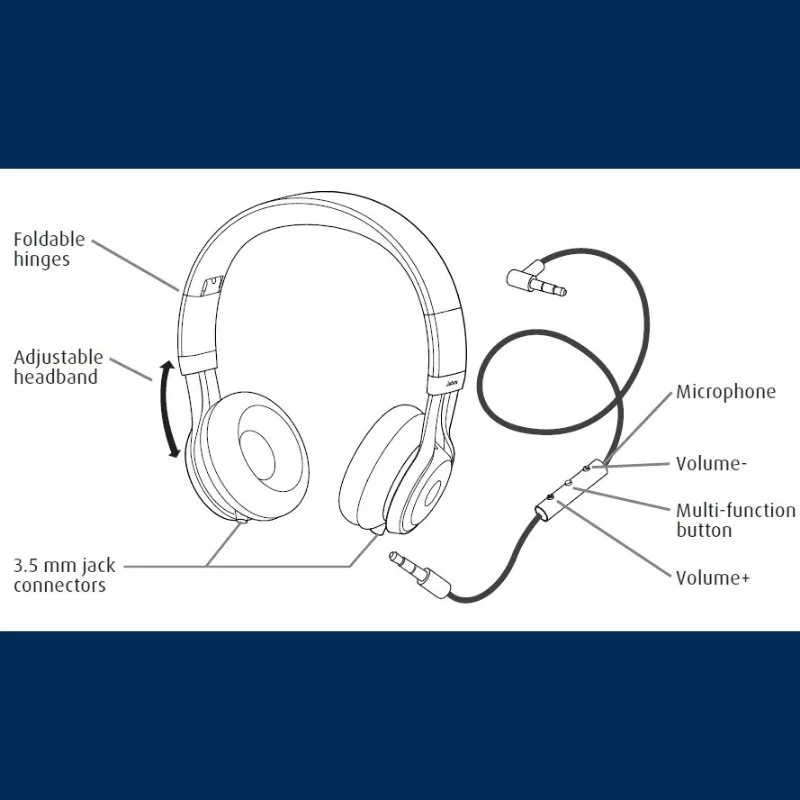
Understanding headset components helps you make informed purchasing decisions
Speakers for our Earpieces
First things first, my man, and it is the speakers. Obviously, it would be the first thing. They are used to deliver sound to your ears. Headsets are of two types:
- Monaural (Single-Ear)
- Binaural (Dual-Ear)
Now let's discuss them one by one:
Monaural Headsets
So basically, monaural headsets are those that cover only one ear at a time. And your other ear stays open. These headsets allow you to keep an awareness of your surroundings.
"What's going on, what other people are doing, you can hear them." Just kidding!!
They are best for listening to your calls and other activities. They're ideal for offices and customer service roles.
Binaural Headsets
Binaural headsets cover both your ears. They are perfect if you want to work being focused and you do not want to divert your attention from your surroundings. They are perfect for gaming and meetings, and most particularly if you work in a noisy environment. They are your best partners.
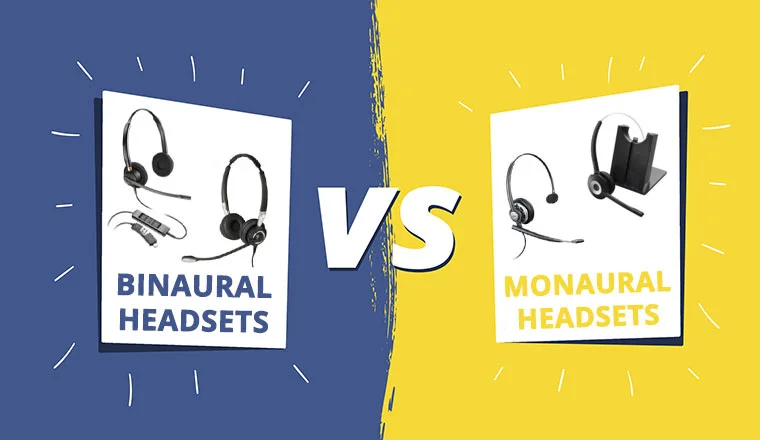
Choose monaural for situational awareness or binaural for immersive focus
Microphone
Microphones are the most important part of your headset. They basically act as your voice. So their main function is to capture your voice clearly and transmit it to the listener without any kind of distortion.
And without a microphone, you cannot just imagine that you would have effective communication. No, no, that is not possible at all.
So if you want to deliver your messages accurately, you need to use a microphone that serves as the tongue of your headset.
There are different microphone types, including:
- Standard microphones
- Noise-canceling microphones
- Boom microphones
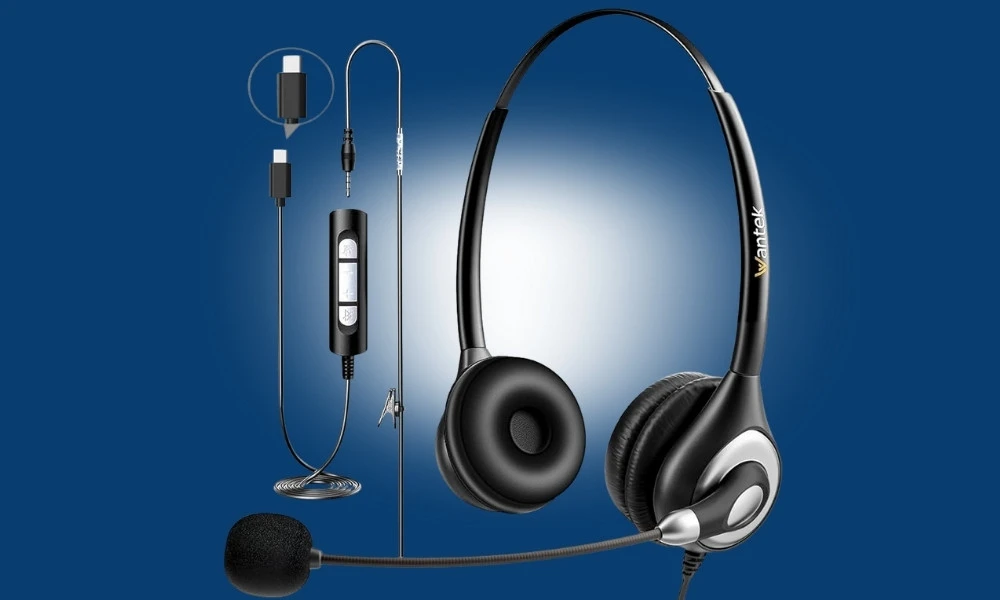
Microphone technology has evolved to filter out background noise and capture crystal-clear voice
A high-quality microphone gives you a clear voice transmission and reduced background noise to make your call quality better and professional.
Microphone Boom
When we talk about the microphone, how can we forget that there is a need for something that can hold that microphone?
So, to hold that microphone, here comes a hero. That is a microphone boom. So, this boom is basically the arm that positions the microphone close to your mouth. Some booms are fixed, adjustable, rotatable, and retractable.
It has several benefits like:
- It improves the voice clarity
- It reduces the random noise pickups
- It is quite flexible, which allows your user to adjust it according to his or her preferences
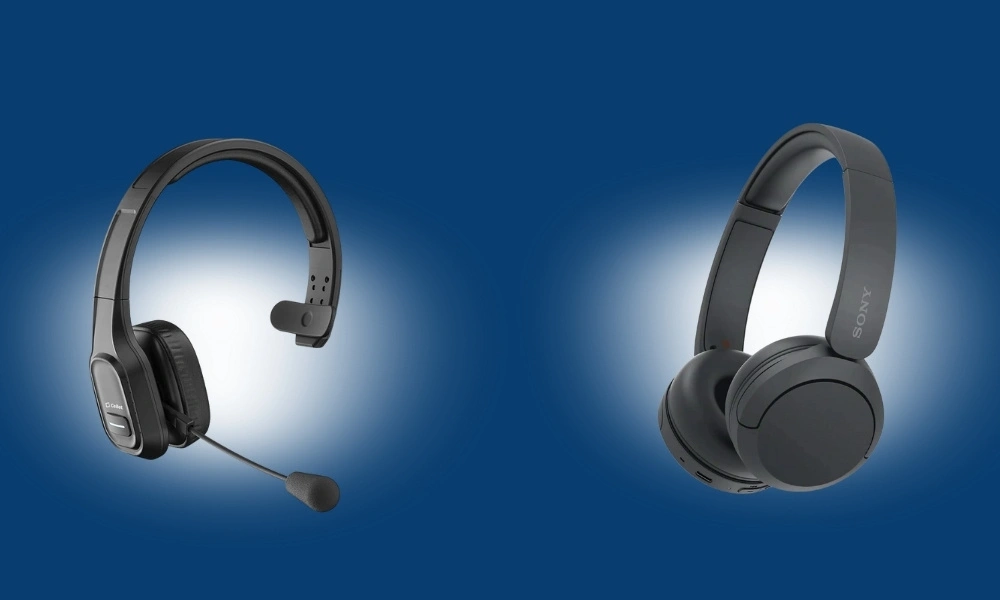
Boom microphones position closer to your mouth for superior voice pickup
Headband or Wearing Style
Okay, so the next part is a headband or a wearing style. So basically headband or a wearing style is a structure that supports your headset, and it keeps the headset in place. It gives you a very comfortable experience of using your favorite headset. There are different types of people with different types of preferences. So every preference is designed according to them, specially for users who wear headsets for long hours. There are some common wearing styles that include:
- Over-the-head
- Behind-the-neck
- On-ear
- In-ear
- Convertible
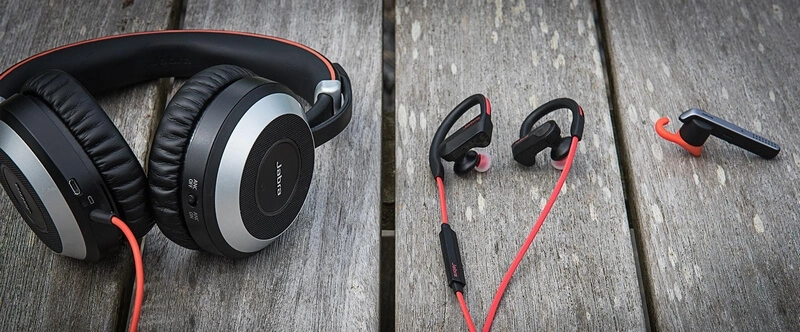
Different wearing styles accommodate various preferences and work environments
All these designs play a very huge role in customer satisfaction because we all know that customer satisfaction leads to sales and enhanced brand image in the market.
Controls and Buttons
There's only one thing that we cannot control in our lives, and that is our wives and our kids. Other than that, everything is controllable.
So the headsets are also under your control. They come with control buttons. Modern headsets offer built-in controls to perform various functions. You can enjoy it with just a little tap.
You can use these buttons to up and down the volume. You can mute or unmute the microphone. These can also help you to answer the call or end the call with these buttons. These controls increase the ease of use and productivity.
Working of Headsets
Before jumping into an explanation of how headsets work. One question arises that is how does it work? Headsets operate when sound signals are converted into electrical or digital signals. Digital signals or electrical signals are then converted back into sound signals when the receiver picks up the call.
Step 1: Your computer, phone, or other device sends the incoming audio call to the headset.
Step 2: The headset speaker converts the electrical or digital signals into sound so you can hear the caller clearly.
Step 3: These signals are sent to the connected device.
Step 4: The signals are transmitted back to the device, and then the listener listens to whatever you say.
What is The Difference Between Wired and Wireless Headsets
There are two main types of headsets: wired and wireless. When people choose a headset, they often get confused about which type to pick. One of the biggest decisions when choosing a headset is whether to go wired or wireless.
Wired headsets connect to your computer or phone with the help of a cable. And wireless headsets do not require any wires. They connect to your devices using Bluetooth or DECT (Digital Enhanced Cordless Telecommunications).
Some other major differences are given in the table below:
| Wired Headsets | Wireless Headsets |
|---|---|
| Connect using cables | Connect using Bluetooth or DECT |
| No batteries required | Require charging |
| Stable connection | Offer freedom of movement |
| Lower latency | Slight latency sometimes |
| Ideal for desks and offices | Ideal for mobile users and multitasking |
Why Choosing the Right Headset Is Important
Sometimes it happens that we have to attend virtual meetings from home urgently. So when we start our meetings, we find our headsets are not compatible. When we choose a poor-quality headset, we face many problems:
- Ear fatigue
- Poor call quality
- Discomfort
- Reduced productivity
- Communication issues
On the other hand, if you choose a good-quality headset for you, it will make you more productive, and you can enjoy your work more:
- Clear conversations
- Better focus
- Improved comfort
- Professional sound
- Enhanced work efficiency
This is why understanding headsets before buying is so important. A little discomfort can cause a big loss or prevent you not presenting your ideas in a better and effective way.
Whether you need headsets for specific phone systems like Polycom, Yealink, or Cisco, our compatibility guides help you find the perfect match.
Different Types of Headsets
There are different types of headsets available in the market. But which one is designed for which work? This is an important question to understand. For this, we need to understand their functions and purpose. Some are built for office environments and for gaming. But there are some others that are designed for mobility or professional communication. When we decide to choose the right type of headset, it depends on how you are going to use this headset, where, and how often you will be using this headset.
There are some major headset types that are mostly used in the market. We have mentioned all the details regarding headsets below.
Office Headsets
These headsets are especially designed for clear voice and clear communication. They are commonly used in:
- Call centers
- Corporate offices
- Customer service departments
- Reception desks
- Remote work setups
These headsets are designed to offer microphone clarity, comfort, and reliability over entertainment features like bass-heavy sound. For professional environments, office headsets are the perfect choice.
Corded Office Headsets
These headsets have a wire with them, which is used to plug into the source. They are old style, but corded office headsets are still widely used. They offer simplicity and stability. They are well known for their amazing features, like:
- No battery required
- Consistent audio quality
- Minimal interference
- Easy setup
They are connected via a cord, so they have connection types like:
- Quick Disconnect (QD)
- RJ9 / RJ11 (desk phones)
- USB (computers)
- 3.5mm audio jack
These headsets are most commonly used for desk phone users or for high-call-volume environments. They offer excellent performance during your busy days. Corded headsets are ideal for using them at one place due to the cord.
Wireless Office Headsets
These headsets do not require a cord for connection. They are an advanced type of headsets that offer you the freedom to move around while staying connected to calls. They offer outstanding performance and perks like:
- Walk and talk freely
- Hands-free multitasking
- Reduced desk clutter
They do not have a cord, so they connect through advanced connection technologies:
- DECT for longer range
- Bluetooth for shorter range
These headsets are most commonly used by managers and supervisors for multitasking. They are best for busy office environments. Wireless office headsets typically come with a base station that connects to desk phones or computers.
Computer Headsets
Computer headsets are made to work with desktops and laptops. They are mostly used for online meetings and online training. Many major businesses also use them for video conferencing, remote work, and voice over IP (VoIP).
Computer headsets have two further types. Each one is designed for a different function and activity. Both are discussed for better understanding.
USB Computer Headsets
The most common type of computer headset is USB headsets. They are very famous for their plug-and-play setup. They offer digital audio processing and offer much better compatibility with conferencing software. They work seamlessly with platforms like:
- Zoom
- Microsoft Teams
- Google Meet
- Skype
For professionals who need reliable computer connectivity, PC headsets offer the best solution.
Bluetooth Computer Headsets
Bluetooth headsets can connect wirelessly to laptops and computers. They do not need any cables for connection. They are portable and can be used anywhere. They offer a connection with multiple devices.
They have some limitations that need to be considered for long-term users. They need to be charged because they are dependent on the charging, and they have a slight latency in some cases.
These headsets are perfect for professionals who have to change between phone calls and computer meetings.
Mobile Headsets
Mobile headsets are made for use with smartphones and tablets. They are lightweight and perfect for hands-free communication. You can carry them with you.
There are further types of mobile headsets. Each one offers different specifications and features to enjoy.
Bluetooth Mobile Headsets
Bluetooth headsets are the most commonly used headsets. They have a compact design, which makes them perfectly portable. They are wireless and offer perfect voice assistant support. They reduce noise from the surroundings.
They are best for commuters or for sales professionals. They are an ideal choice for on-the-go communication.
Single-Ear Bluetooth Headsets
Single-ear headsets are perfect for those people who need to stay aware of their surroundings. They allow one ear to remain open while the other handles calls. They are small and can be used during:
- Driving
- Delivery services
- Fieldwork
- Retail environments
Gaming Headsets
When players game, they communicate with each other. For that purpose, they need something that can deliver them an accurate voice with clarity. Gaming headsets are designed for high-quality sound and communication. Gaming headsets are compatible with PCs, consoles, and mobile devices.
They focus on:
- Stereo or surround sound
- High-quality microphones
- Comfortable ear cups
- Extended wear comfort
Key Gaming Headset Features
Gaming headsets are designed keeping the player's needs in mind. They offer their users:
- Enhanced bass
- Directional audio
- Adjustable microphone booms
- LED lighting (in some models)
Call Center Headsets
The call center industry is the most busy industry in terms of communication. Their agents constantly stay on call, answering and assisting clients and customers. So these headsets are made for all-day use. These headsets are made to handle hundreds of calls per day. They do not cause any discomfort.
They have different features like an ultra-comfortable design, durable construction, noise-canceling microphones, and replaceable ear cushions.
Noise-Canceling Headsets
Do you also get frustrated when you put on headsets to ignore someone, but you still hear them? If yes! Then you need to use noise-canceling headsets. They reduce unwanted background noise. There are two different types of noise-cancellation headsets:
- Passive Noise Isolation
- Active Noise Cancellation (ANC)
Professional & Specialized Headsets
Professional headsets are designed to meet strict performance standards. They are used in industries where noise distortion has no place at all. A single miscommunicated word can cause a lot of devastation and damage. Some industries require specialized headset solutions like:
- Aviation
- Broadcasting
- Dispatch centers
- Healthcare communication
A Short Table To Show Wired vs Wireless Use-Case Comparison
| Situations | Perfect Match |
|---|---|
| Remote work | USB / Wireless |
| Gaming | Wired / Wireless |
| High noise areas | Binaural with ANC |
| Mobile use | Bluetooth |
| Call centers | Wired |
Headset Connectivity, Technologies, and Compatibility
Imagine you are gossiping with your best friend, and in the middle of the conversation, you get disconnected. How would you feel? So it is important to understand that connectivity is a very important feature. It is one of the most overlooked but most critical features. Even the best headset becomes useless if it does not properly connect to your device.
Why Headset Connectivity Matters
Connectivity determines several factors in your headset. They are:
- Audio quality
- Call stability
- Compatibility
- Ease of use
- Flexibility across devices
When you understand different headset connection types, it can help you avoid common mistakes and make sure that you select a headset that fits your setup perfectly.
Major Headset Connection Types
Headsets connect to devices by using wired or wireless methods. Each headset has unique advantages depending on how you use it.
Wired Headset Connections
Wired headsets are most commonly used in offices and professional environments. This is because they are reliable and simple.
They have different connection types, like USB Headsets, 3.5mm Audio Jack Headsets, Quick Disconnect (QD) Headsets, and RJ9 / RJ11 Desk Phone Connections.
USB Headsets
USB headsets connect directly to computers or laptops using a USB-A or USB-C port. They work simply:
- Audio is transmitted digitally
- No sound card required
- Plug-and-play functionality
USB headsets are excellent partners for voice clarity. They offer a stable connection and are very easy to set up. They get connected with most of the operating systems. They are widely used in remote work, video conferencing, online meetings, and VoIP calling.
3.5mm Audio Jack Headsets
This is the traditional analog audio connector, which is used on phones, tablets, and computers. These headsets are best for basic communication and casual use. There are two types of 3.5mm audio jack headsets:
- Single 3.5mm plug
- Dual plug (separate mic & audio)
They are very simple and cost-effective. They do not need any drivers and offer universal compatibility. They have a few limitations as well to be considered, as audio quality depends on device hardware. And they offer less control over digital sound processing.
Quick Disconnect (QD) Headsets
Are you also thinking what this Quick Disconnect is? Well, Quick Disconnect headsets are those that allow their users to disconnect them from the phone or amplifier without removing the headset. They are commonly used in call centers and offices.
They offer easy mobility and are perfect for protecting equipment. They are perfect for desk setups. QD headsets need an adapter or amplifier to connect to desk phones.
RJ9 / RJ11 Desk Phone Connections
RJ9 / RJ11 desk phone headsets connect directly to old desk phones. They are perfect for offices, call centers, and reception areas.
Not all desk phones use the same wiring standards, so compatibility must be checked. Our compatibility guides help you find the right match for phone systems like Avaya, Cisco, Nortel, and more.
Wireless Headset Technologies
Wireless headsets are cord-free, and they offer you freedom of movement and convenience. But they rely on radio technologies and batteries.
Bluetooth Headsets
Bluetooth is the most common wireless technology used in professional headsets. They work by creating a short-range wireless connection between the headset and the device. They are very compact, and the device is very adjustable to the situation.
Bluetooth headsets are perfect for working with phones, tablets, and computers. They do not need a base station. There are some limitations for Bluetooth headsets. They have a limited range, which is 30 feet. They depend on batteries and face interference as well. Bluetooth headsets are perfect for mobile professionals and workers who work in co-working spaces.
DECT Wireless Headsets
DECT stands for Digital Enhanced Cordless Telecommunications. It is designed for professional environments. They provide long-range connections with extremely little interference.
DECT offers clear and stable calls and has up to 300 plus feet range. They are the best option for offices, call centers, and large offices. They are most helpful for people who move around. DECT headsets usually connect via a base station.
Difference Between Single-Device and Multi-Device Connectivity
Our old headsets were made to help only one device at a time. But with the advancement, many new headsets support connection to multiple devices. A brief difference between them is explained in the table below.
| Single-Device Headsets | Multipoint Headsets |
|---|---|
| Connect to only one device at a time | Connect to two or more devices simultaneously |
| Simple setup | Connected to a laptop and smartphone |
| Less flexibility | Seamless switching between calls |
| Cost-effective | Little expensive |
Compatibility with Devices & Systems
Before buying a headset, compatibility is critical. UC-certified headsets provide special buttons and improved reliability. This provides better customer satisfaction and increases brand image.
| Computer Compatibility | Smartphone Compatibility | Desk Phone Compatibility | UC Platforms |
|---|---|---|---|
| Compatible with Windows | Compatible with iOS | Depends on wiring standard | Microsoft Teams |
| Compatible with macOS | Compatible with Android | Depends on amplifier requirements | Cisco Webex |
| Compatible with ChromeOS | - | Depends on headset port availability | Zoom, Skype |
If you're using specific phone systems, check our detailed compatibility guides for Aastra, Grandstream, NEC, Panasonic, Polycom, ShoreTel, Snom, Toshiba, and Yealink.
Audio Codecs and Call Quality
Wireless headsets depend on audio codecs to transfer sound. Better codecs offer clearer sound, and they also reduce the delay in the sound coming. They offer better voice quality. Some common codecs are:
- SBC
- AAC
- aptX
- LC3
Latency and Performance Considerations
Latency is the delay between audio input and output. If you want a headset that can offer you nearly zero latency, then wireless headsets are perfect for you. Whereas wired headsets may have a slight delay. So for calls and meetings, wireless offers a latency that is very less and unnoticeable.
Wireless Headsets Power and Charging Option
Long battery life is very important for all-day users. And wireless headsets need power management. They have built-in rechargeable batteries. Some common types of charging options are USB charging, charging docks, and fast charging support.
Security and Wireless Disturbance
Professional environments often require secure communication. DECT headsets offer safe communication and low disturbance. Bluetooth security has also improved in recent years.
Choosing the Right Connectivity for Your Needs
| Choose Wired If | Choose Wireless If |
|---|---|
| You want maximum reliability | You need mobility |
| You work at a desk | You multitask often |
| You don't want to worry about charging | You work in dynamic environments |
Common Connectivity Mistakes to Avoid
When we visit the market for headsets, according to our connectivity needs. We often end up making some common mistakes. Those are:
- Buying incompatible headsets
- Ignoring device requirements
- Overlooking battery life
- Choosing Bluetooth when DECT is needed
By reading this blog, you will save yourself from making these mistakes, which cost us money and time.
Sound Quality, Microphones & Noise Control
Sound quality is one of the biggest reasons people upgrade or replace their headsets. Poor audio can lead to miscommunication and reduced productivity. In the business world, specially "time is money", so when communication is interrupted, it causes listener fatigue and frustrating calls.
For professional users, sound quality is not about loud music. It's about clear voices, natural tones, and accurate reproduction. Sound quality in headsets is affected by multiple technical and design factors working together. We will discuss all of them one by one.
How Frequency Response Affects Headsets?
Frequency response is the range of sounds that is produced by the headset. They are measured in Hertz (Hz). A normal human can hear frequencies that range from 20Hz. This is a low bass, and 20000 Hz is a high bass.
For voice-focused headsets, mid-range frequencies are the most important. It is because humans can easily hear them. Frequency response matters a lot in the performance of a headset. Low frequencies affect bass, and mid frequencies affect voice clarity. And the high frequencies affect detail.
What is the difference between Mono and Stereo Audio
Mono Audio
They deliver the sound by one channel. But they offer very good voice quality during communications. They are mostly used in call center headsets.
Stereo Audio
They deliver the sound to both ears. These are mostly used in meetings or media headsets. Gamers also have this type in their headsets.
Size and Design of Speaker Driver
Speaker drivers work by converting electrical signals into sound. Their size and design of these speaker drivers affect the working of the headsets. If drivers are large in size, they produce fuller sound. This gives you a feeling of excitement and joy. Small-sized drivers offer clarity of sound.
Driver materials also affect the sound quality. If you go for high-quality material, it is more durable. They cost you a little more but offer clear voices, less distortion, and listening comfort.
Difference Between Open-Back and Closed-Back Design
Closed-Back Headsets
They offer you good quality sound that you are listening to and avoid other sounds. They offer less voice leakage. This makes them best for noisy environments.
Open-Back Headsets
They are good, but you can not avoid the surrounding sound from interfering with your sound. They offer airflow, and because of this, you can enjoy natural sound.
Most of the professional headsets use closed-back designs for clarity of sound and focus.
Microphones
If there is a component that can become your voice is the microphone. It is the main part that determines how others hear you. So, using a good quality microphone is essential in making others hear what you want to deliver.
There are two types of microphones that are:
- Standard Microphones
- Noise-Canceling Microphones
Standard Microphones
Standard microphones are an old type of microphone. They can capture voice and background noise, and users can get disturbed if not sitting alone. So these are suitable for quiet environments.
Noise-Canceling Microphones
Noise-cancelling microphones are best for filtering out background noise. You get a very clean and clear voice that is very important for offices and coworking spaces. Noise-canceling microphones make your call experience better.
Difference Between Boom Microphones and Integrated Microphones
| Boom Microphones | Integrated Microphones |
|---|---|
| They are kept close to the mouth | They are made into earcups or earbuds |
| They provide better voice pickup | They have a very compact shape |
| They are adjustable and very flexible | They do not offer complete voice isolation |
Boom microphones are preferred for professional calls.
Microphone Sensitivity & Directionality
The microphone sensitivity determines how much sound is picked up by the headset. If they have low sensitivity, they do not pick up more details, but high sensitivity captures more details.
Moreover, if microphones are unidirectional, they pick up the voice from one direction. But if they are omnidirectional, they capture sound from all directions. Professional headsets usually use unidirectional microphones for clarity.
Noise Control Technologies in Headsets
Noise is one of the biggest challenges in modern work environments. To control these voices there are two types of technologies:
- Passive Noise Isolation
- Active Noise Cancellation (ANC)
Passive Noise Isolation
When ear cups are designed, they are made for passive noise isolation. Cushion material is installed in them to make them more comfortable and to fit perfectly. This works great in blocking the external sound without electronics.
Active Noise Cancellation (ANC)
ANC uses microphones and electronic processing. This process is used to lower the background noise. They have mics outside that detect surrounding sound and create opposite sound waves to cancel the noise. This neutralizes noises.
They improved focus during work. They reduce fatigue. They provide clearer sounds during calls.
Side Tone (Sideline Audio)
Sometimes it happens that we want to hear how we sound. For this, headsets come with a unique feature that is side tone. This allows users to hear his own voice while speaking. This is a very beneficial option that has several benefits. It helps you:
- It helps you prevent unnecessary shouting
- It makes your voice feels more natural
- It effectively reduces vocal strain
Digital Signal Processing (DSP)
DSP short form of digital signal processing, helps you enhance your audio performance. It reduces noise from the surroundings and balances out your frequencies. And through this, it improves your voice clarity. DSP works behind the scenes to deliver consistent call quality.
Call Clarity vs Music Quality
We know that not all headsets are designed for music. There are different types of headsets for calls and music. To understand their difference, lets see the table. We explain everything to make it clear about your choices and selection.
| Voice-Optimized Headsets | Entertainment Headsets |
|---|---|
| Clear speech | Enhanced bass |
| Reduced bass | Wider frequency range |
| Ideal for calls | Better for music and gaming |
Common Sound Quality Problems
When we use our headsets, they sometimes show some problems in delivering the right sound quality. There are different factors that cause these problems.
- Echo: It is caused by poor microphone placement, and it can be fixed with proper headset tuning.
- Distortion: It occurs at high volumes, and it is an indication of low-quality drivers.
- Background Noise Pickup: They are common and can be solved by using noise-canceling microphones.
How to Test Headset Sound Quality
There are many ways that can help you determine which headset is your perfect match. Before buying any headset, you can test it.
- You can make a test call
- You can record your voice samples
- You can check the microphone by adjusting the microphone positions
- You can test it in real environments to check if it's compatible with you or not
Choosing Headsets Based on Audio Needs
| Choose Voice-Focused Headsets If | Choose Balanced Audio Headsets If |
|---|---|
| You handle frequent calls | You combine work and entertainment |
| You work in customer support | You listen to the media between calls |
| You attend virtual meetings | You watch entertainment shows |
Comfort, Ergonomics & Build Quality
If your headset is uncomfortable, you probably won't wear it. Comfort is most important for professionals who wear headsets for hours every day. If they cause you discomfort, it can lead to: headaches, ear pain, neck strain, reduced focus, and lower productivity.
So it is very important to take care of the health of your ears and brain by using good-quality and comfortable headsets.
Key Comfort Factors in Headset Design
Comfort depends on several design elements working together.
Headband Design
If we put something heavy on our head, it causes severe discomfort and a headache. The same is the case with headsets. The headband is designed to distributes the headset's weight across the head.
Important Headband Features:
- Headsets are designed with adjustable lengths to fit your head and ear properly
- They are made with a very lightweight material to make them easily wearable
- They are padded with cushions to support your ear
- They come with balanced clamping force, and a good headband should feel secure but not tight
Wearing Styles
Headset sellers like Findheadsets.com know that different users prefer different wearing styles. So we offer different styles to fit your preference and comfort. Some common types of wearing styles are given below:
- Over-the-head
- Behind-the-neck
- On-ear
- In-ear
- Convertible
Ear Cushion Types
Ear cushions are very important for human ears. They affect the comfort and health of your ears. There are different types of ear cushions with different features and factors.
Foam Cushions
They are very lightweight and very budget-friendly. They make less heat when we use them.
Leatherette Cushions
They are known for providing better voice quality. They are a little expensive but are durable.
Gel Cushions
They are very comfortable and very budget-friendly. You can use them for a longer period of time because they do not put pressure on your ears.
When we select the right cushion type, it gives you comfort and increases your focus on work.
On-Ear vs Over-Ear Design
| On-Ear Headsets | Over-Ear Headsets |
|---|---|
| They sit on your ear perfectly because of their lightweight | They properly surround your ears and offer the most comfort for long-term use |
| They offer less isolation | They offer better noise isolation |
Weight Distribution
A well-balanced headset always feels lighter, and it also reduces pressure points on your head and ears. They are designed perfectly to prevent fatigue and headaches, or earaches.
Clamping Force
Clamping force is a measurement of how tightly the headset presses your head. According to the clamping force:
- Too tight = discomfort
- Too loose = unstable fit
So, high-quality headsets maintain the perfect balance and offer comfort.
Adjustable Components
Adjustability of components means that headsets are a custom fit. There are a few adjustable elements of headsets that are:
- Headband
- Ear cups
- Microphone boom
"The more adjustable a headset is, the more users it can comfortably fit."
Heat and Breathability
When we use headsets for a long period of time, they get very warm and uncomfortable. You can solve this problem by selecting a headset that has options like:
- Breathable materials
- Ventilated ear cushions
- Lightweight designs
Durability and Build Quality
When it comes to durability, you need to understand that a headset is an investment. Durability means how long it lasts, and this lasting depends on its build quality. Other than this, there are some other important factors as well.
Frame Material
| Plastic Frames | Metal-Reinforced Frames |
|---|---|
| Lightweight | Slightly heavier |
| Affordable | Stronger |
| Less durable | More durable |
Cable Quality (Wired Headsets)
The cable quality of headsets decides the functioning of the headsets. If the cable is of poor quality, it leads to early failure. To avoid this, you need to look for cables that are strong connectors, flexible cables, and a strain relief design.
Hinges and Moving Parts
When we adjust our headsets, it affects the hinges and moving parts. Good quality headsets have strong joints and durable swivels.
Replaceable Parts
At Findheadsets.com, we offer our customers professional headsets. They allow you to replace ear cushions, headbands, and microphone booms when needed. This increases product life and decreases extra costs.
Durability for Different Environments
How long a headset will work depends on how it's used and for how long it has been used for.
- Office Use: They need moderate durability.
- Call Centers: They need high durability.
- Mobile Use: For them, only compact and sturdy designs are preferred.
Comfort for Every Industry
| Call Center Agents | Remote Workers | Gamers |
|---|---|---|
| Lightweight in use and does not put stress on the head and ears | They can use headsets all day | They can use them for a longer time |
| They can use binaural or mono. It depends on their choice | They can use over-the-ear | They can adjust the headband |
| These headsets have very breathable cushions | These headsets offer them noise isolation | These headsets have cushioned ear cups |
How to Check Comfort Before Buying
You can check the comfort level of headsets by wearing them for 30–60 minutes. You can adjust all components and test them. This will resolve comfort issues that often appear after extended use. And you will be able to buy yourself the best and comfortable headset.
Maintenance & Cleaning for Comfort
When you use your headset regularly, it increases the risk of ear infection and other health problems. So it is important to clean them properly.
Cleaning of headsets can help you prevent odor and maintain cushion softness. When headsets are cleaned, their life span also increases. These simple habits increase the long-term comfort of your headsets.
How to Know If Your Headset is Comfortable
If you think that your headset is not comfortable, then you need to make some changes to your headset. And if these changes do not work, then you have to go for a new one.
Notice the symptoms if you have any of these. You will get ear soreness and headaches after calls. You will be continuously adjusting your headset, or you will feel discomfort during long meetings. These are signs that show that you need a new headset fit.
Battery Life & Wireless Power Management
Wireless headsets are your best partners when it comes to convenience and freedom of movement. But they also have some limitations, as their performance depends on battery reliability. If you have a headset with poor battery life, it can disturb your meetings calls or work sessions. This is a big cause of frustration and poor productivity.
We suggest that professionals who rely on wireless headsets all day need to consider battery life as important as sound quality and comfort.
Understanding Wireless Headset Batteries
Modern wireless headsets are coming with built-in rechargeable lithium-ion or lithium-polymer batteries. These batteries are lightweight and do not make headsets feel heavy on the ears or over the head. They can easily be recharged, and if you properly care they can have a long life span. And if you have a longer use, then you can charge them frequently, they are made for that.
Battery Life Metrics Explained
Battery life means how long your headset will perform. It usually depends on a few factors like:
- Talk time (hours of calls)
- Listening time (music or audio)
- Standby time (time when not actively used)
Talk Time: It is how long you can actively talk on calls before the battery ends.
Standby Time: It is how long the headset can stay powered on without use.
Battery Ranges
Different headsets have different battery life ranges. It depends on factors like how good your headsets are. There are some other factors that show the battery range. They are volume levels, Usage of ANC, Bluetooth or DECT usage, and call frequency.
Based on these factors, there are different battery ranges:
- Entry-level headsets have 6 to 10 hours of battery life
- Mid-range headsets have 10 to 18 hours of battery life
- Professional headsets have 20+ hours of battery range
Charging Methods for Wireless Headsets
When it comes to charging, wireless headsets come with multiple charging options. Each one has its own perks and can be used under certain circumstances.
| USB Charging | Charging Docks & Base Stations |
|---|---|
| Most common method | Professional wireless headsets |
| Universal compatibility | Easy drop-and-charge |
| Works with laptops, adapters, and power banks | Organized desk setup |
| Easy and convenient | Visual charging status |
Fast Charging Technology
Fast charging means charging your device for short charging sessions. This provides hours of use. This feature is extremely useful for busy professionals. It simply means that:
15 minutes of charging = several hours of talk time
Battery Indicators and Alerts
When you use headsets, how do you come to know that you need to recharge your device again? There are some indicators that alert us about battery drainage, like:
- LED indicators
- Audio alerts
- App notifications
These alerts help users avoid sudden shutdowns during calls.
Power Management Features
Power management features allow you to save the battery of your headset when you are not using it, or even when you are using it. Advanced headsets include intelligent power-saving features. This power management is done by:
- Auto Sleep Mode: In this feature, headsets automatically turn off when not in use.
- Smart Sensors: These sensors detect your headsets when they are worn and adjust power usage accordingly.
- Adaptive Power Usage: Headsets adjust their power use based on call activity, audio streaming, and noise cancellation usage.
Effect of ANC on Battery Life
When we use the Active Noise Cancellation feature, it uses more power from our headsets. There are some basic considerations that you need to take into account:
- ANC reduces overall battery life
- Some headsets allow ANC toggling
- Balanced usage maximizes battery performance
DECT vs Bluetooth Battery Performance
| Bluetooth Headsets | DECT Headsets |
|---|---|
| Lower power consumption | Higher power usage |
| Shorter range | Longer range and stronger connection |
Battery Lifespan & Degradation
When you keep on using headsets for a long time, their rechargeable batteries degrade. Battery health is affected by overcharging and when it is exposed to extreme temperatures. There is one more common mistake we all make that degrades the battery's health, and that is frequently discharging completely.
Proper charging habits can extend the battery lifespan.
How Can You Take Care of Battery
If you want to save your headset battery from early damage then you need to maintain long-term battery health. That can be done by avoiding letting the battery discharge completely.
You should not leave the charger on overnight continuously, and store it at room temperature. And always go for manufacturer-approved chargers.
Difference Between Replaceable and Non-Replaceable Batteries
| Replaceable Batteries | Built-in Batteries |
|---|---|
| It extends headset lifespan | It requires the replacement of the wholesale headset |
| It is common in professional models | These batteries have a compact design |
Professionals always prefer replaceable battery options.
How is Battery Life Used for Different Cases?
| Call Center Use | Remote Work | Mobile Use |
|---|---|---|
| It requires all-day battery life | It requires a long talk time | It needs a compact battery design |
| Charging ports are required | Fast charging is very important for this | Good power management is important |
Wireless Range and Power Consumption
When the range increases, headsets consume more power. A greater wireless range usually requires more power. Bluetooth headsets have approximately 30 feet. And DECT have 300+ feet range.
Charging Time vs Usage Time
When you use a good headset it balances out all of your charging time problems. A good headset always balances:
- Short charging time
- Long usage duration
Fast charging significantly improves the user experience.
How to Choose A Better Headset Based on Battery Needs
If you want to buy yourself a better and good quality battery headset, then you need to ask yourself a few questions like:
- How many hours do I talk per day?
- Can I charge during breaks?
- Do I need fast charging?
- Will I use ANC often?
When you answer all these questions, you will be getting yourself the right headset.
Common Battery-Related Mistakes
People think that they only need to charge their headsets, and they make very common mistakes. These mistakes not only damage the headset but also degrade the batteries.
- You should not ignore battery features
- You should know you are overusing ANC
- If you have poor charging habits, it will affect the battery life
- If you choose low-capacity batteries for heavy use, they will damage your headset
Avoiding these mistakes can improve your long-term satisfaction.
Choosing the Right Headset for Your Needs
After learning everything about headsets, it's time to make the right choice for your specific needs. Different use cases require different features and specifications.
Headset Recommendations by Use Case
| Office/Call Center | Remote Work/Home Office | Gaming | Mobile Professionals | Casual Use |
|---|---|---|---|---|
| Focus on clear voice transmission | Flexible connectivity (USB/Bluetooth) | Stereo or surround sound | Compact Bluetooth headsets | Simple audio quality |
| Noise-canceling microphones | Balanced sound quality for calls and media | Boom mic with noise cancellation | Hands-free communication | Comfortable fit |
| Comfortable for all-day wear | Lightweight and comfortable | Over-ear comfort for long sessions | Multipoint connectivity (phone + laptop) | Budget-friendly options |
| Wired or DECT wireless connectivity | Long battery life for wireless models | Optional RGB or aesthetic features | Quick charge capabilities | Basic wired or Bluetooth |
Budget Considerations
| Price Range | Features | Best For |
|---|---|---|
| $20–$50 | Basic call quality, wired | Casual users |
| $50–$150 | Noise-canceling, USB/Bluetooth, comfort | Remote workers, professionals |
| $150–$300 | Premium sound, ANC, DECT, long battery, replaceable parts | Call centers, gamers, executives |
| $300+ | Enterprise-grade, multipoint, ultra-durable | Large offices, specialized industries |
Choosing based on use case and budget ensures you get maximum value.
Brand & Warranty Considerations
FindHeadsets.com offers headset brands with certified UC (Unified Communications) compatibility and solid reviews. With us, you can enjoy headsets from a brand that offers:
- Reliable customer support
- Product warranties
- Replacement parts availability
Our Poly headsets and other premium brands come with full warranty coverage and expert support.
Predictions for 2025 and Beyond
- AI becomes standard in high-end headsets
- Sustainable materials will dominate mid-range and premium models
- Wireless will outpace wired in most professional and gaming use cases
- Integration with productivity tools will increase
- Personalized audio experiences based on AI learning will become mainstream
How Can You Stay Ahead
If you want to purchase a headset that has modern and innovative features and specs, then you need to consider a few tips from us.
- You can follow trusted headset sellers like Findheadsets.com and brands and technology blogs
- You can also consider future-proof features when you go to buy a new headset for yourself
- You should prioritize wireless connectivity, AI support, and comfort first, and you should test it as well
- You should invest in headsets that allow modular upgrades so that you can upgrade your device when new updates come
Increase Your Headset Experience
You can increase your headset experience by adjust the mic and ear cushions for comfort. If you need noise cancellation only then use ANC. Always change the damage part and clean the headset and parts regularly. And keep your software updated.
Headset Questions Answered
Headphones are for listening only, while headsets combine headphones with a built-in microphone for two-way communication. Headsets are designed for calls, meetings, gaming, and customer support.
Wired headsets offer stable connections and no battery concerns - ideal for desk work. Wireless headsets provide mobility and freedom - perfect for multitasking. Choose based on your mobility needs.
Bluetooth headsets have approximately 30 feet range, suitable for mobile use. DECT headsets offer 300+ feet range with minimal interference, designed for professional office environments.
Check our detailed compatibility guides for your specific phone system. Visit our compatibility guide page to find guides for Cisco, Polycom, Yealink, Avaya, and more.
Call center headsets need all-day comfort, durable construction, noise-canceling microphones, and replaceable ear cushions. Wired or DECT wireless options work best for high-volume calling.
Entry-level: 6-10 hours, Mid-range: 10-18 hours, Professional: 20+ hours. Battery life depends on volume, ANC usage, and connection type.
Conclusion
You can use headsets for all the businesses and personal use. Every industry has different requirements and need extra features. At Find Headsets we provide wire, wireless, mobile, telephone, gaming, and call center headsets. Our headsets are compatible with your devices and offer ANC and other features to fulfill your requirement.
Explore Our Resources
Need Help Choosing?
Our experts are here to help you find the perfect headset for your needs.
View Buying Guide