×
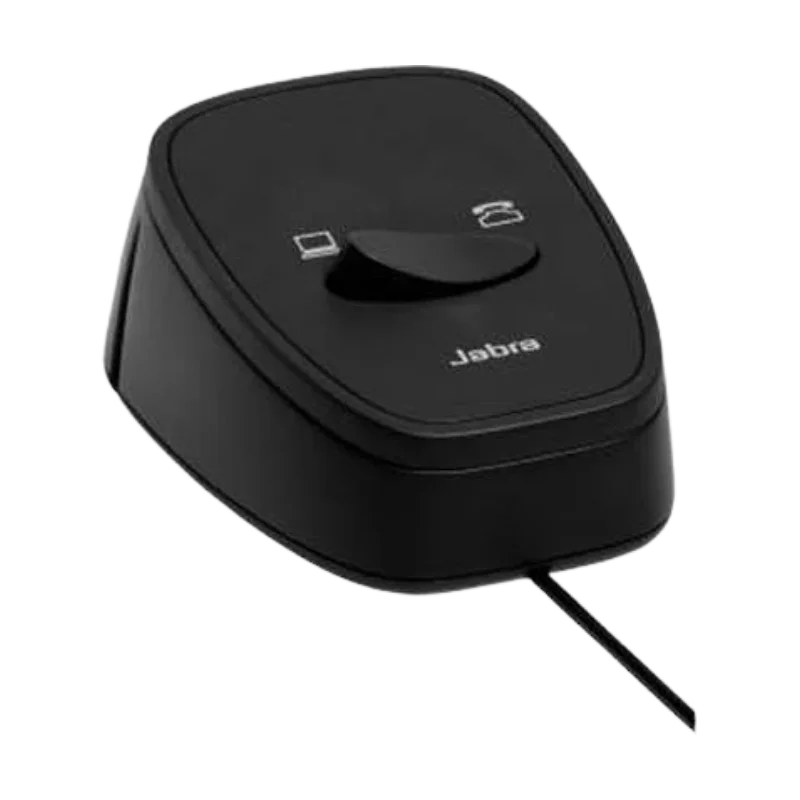
![Jabra Link 180 Desk & PC USB Switch for VOIP]()
1 / 1
Jabra Link 180 Desk & PC USB Switch for VOIP
34+ bought in past month
Price:
$115.00
Stock:
In Stock
24/7 Support
Same Day Dispatch
Easy Returns
Warranty 2-Years
Jabra Link 180 Desk & PC USB Switch for VOIP
The Jabra Link 180 is a compact USB switch that lets you toggle your Jabra headset or speakerphone between two connected devices: a desk phone and a PC. If you use a USB headset for softphone calls but also need to answer your traditional desk phone, this switch eliminates the need to unplug and replug cables. With the press of a button, you can switch audio between your computer and your desk phone. It is the perfect accessory for receptionists, executives, or anyone who juggles calls on multiple systems.
How It Works
The Link 180 connects to your computer via USB‑A and to your desk phone via an RJ9 cable (included). Your Jabra headset (or speakerphone) plugs into the Link 180’s headset port. The switch has a large, easy‑to‑press button that toggles between “PC” mode and “Desk Phone” mode. When in PC mode, your headset works with your softphone (Teams, Zoom, etc.). Press the button, and audio instantly routes to your desk phone – you can answer or make calls using your headset without touching the handset. The switch is powered by USB, so no external power supply is needed. An LED indicator shows which mode is active. For other workspace efficiency tools, check out our selection of corded headsets at FindHeadsets.
Compatibility & Design
The Jabra Link 180 is compatible with most Jabra USB headsets and speakerphones, including:
Jabra Evolve series (20, 30, 40, 60, 65, 75, 80)
Jabra Engage series (with USB connection)
Biz 2400 II USB models
Jabra Speak series (410, 510, 710)
On the desk phone side, it works with any desk phone that has a modular RJ9 handset port (most Avaya, Cisco, Panasonic, Mitel, and NEC models). The switch is compact (approximately 3 x 2 x 1 inches) and sits discreetly on your desk. It includes a 1.5m (5ft) USB cable, an RJ9 cable, and a quick start guide. The button is backlit for easy visibility. The switch is plug‑and‑play – no drivers or software required. It supports both narrowband and wideband audio.
Why Choose This Product
Without a switch, using a single headset for both a PC softphone and a desk phone requires constantly swapping cables – or using two separate headsets. The Link 180 solves that problem with one button. It saves desk space, reduces cable clutter, and saves you from buying a second headset. It is also a great solution for hot‑desking environments, where users may have different desk phones but the same PC. The switch is passive – no latency, no audio degradation. It is also affordable compared to buying a second headset or a full dual‑phone EHS system.
One‑button switching: Toggle between PC (USB) and desk phone (RJ9) instantly.
Compatible with Jabra USB headsets: Evolve, Engage, Biz, Speak series.
Works with most desk phones: RJ9 handset port – Avaya, Cisco, Panasonic, etc.es
Plug‑and‑play: No drivers – powered via USB.
LED status indicator: Shows which mode is active.
Compact desk design: Small footprint, includes cables.
Customer Reviews
Write a Review