
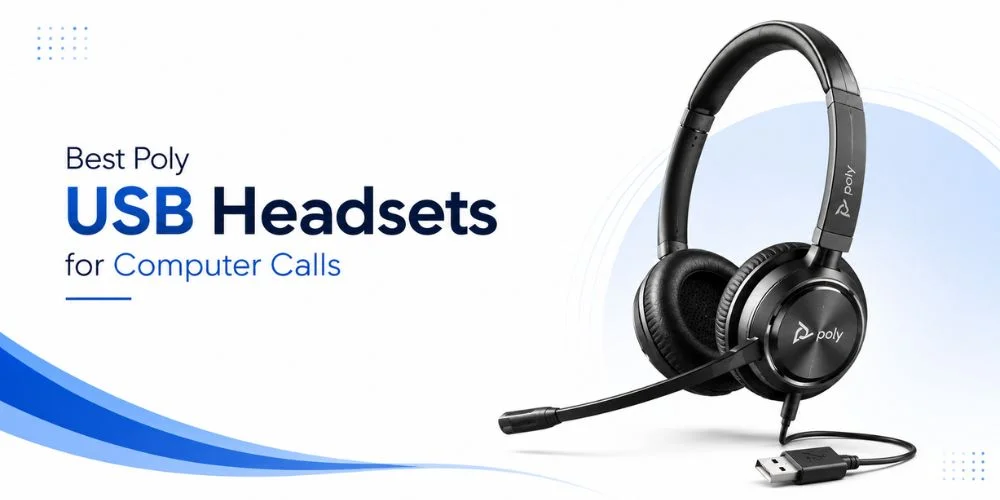
One of the most essential things that one requires when spending the day in the computer calls is a USB headset. Whether you are talking to customers, having virtual meetings or working with colleagues, appropriate headset can make your communication sound and make your work more comfortable.
Poly has a number of USB headset lines, yet each is tailored to various business requirements. There are models that concentrate on reliable wired performance of office desks and others that offer flexibility to hybrid and remote workers, which is wireless. The wrong model may make you spend money on features that you do not need- or miss the features that you need the most.
This guide will compare the best Poly USB headset for computer calls and how each model works in a real world setting. Rather than just rattling off the specifications, we will assist you in knowing what headset fits your work style, communication platform, budget, and daily routine.
At the conclusion of this guide, you will be able to tell precisely which Poly USB headset fits your business or home office.
Our Top 3 Picks
These three models are a good place to start, as they address the requirements of the majority of business users, both in the office and working remotely.
| Award | Recommended Headset | Why We Chose It |
|---|---|---|
| Best Overall | Poly Blackwire 8225 | Premium call quality, ANC, and all-day comfort |
| Best Wireless | Poly Voyager Focus 2 UC | Ideal for hybrid professionals who need mobility |
| Best Budget | Poly Blackwire 3325 | Reliable performance at an affordable price |
Why Businesses Choose Poly USB Headsets
Business communication needs more than good speakers. A professional poly headset must provide stable audio, minimize distractions, and be comfortable during the working day.
This is why Poly USB headsets are still being invested in by many organisations.
Key benefits include:
- Meeting and customer call voice quality.
- Noise-cancelling headphones that minimize external noises.
- Easy to wear long-lasting designs.
- Wireless and wired solutions to various working conditions.
- Extensive interoperability with major communication systems.
- Stable performance in the day-to-day business.
Successful businesses instead of selecting the most expensive headset, they are after the model that best fits in the daily workflow of their employees.
Best Poly USB Headsets for Computer Calls
Poly Blackwire 8225 is the best overall Poly USB headset for computer calls due to its combination of high-quality voice, Active Noise Cancellation (ANC), prolonged comfort, and dependable wired functionality. The Poly Voyager Focus 2 UC is the most robust options should you want to have wireless mobility, whereas the Poly Blackwire 3325 provides exceptional value in standard office communication.
1. Poly Blackwire 8225 – Best Overall Poly USB Headset
Poly Blackwire 8225 is a gadget tailored to those professionals who have most of their day on calls. No matter who you are serving or chairing a virtual meeting or sitting in a crowded office, it provides high-quality audio with no concerns about charging a battery.
Its Active Noise Cancellation (ANC) is used to minimize the distractions around, and the comfortable design allows it to be used over a long period.
Key Features
- USB-A and USB-C connectors are available.
- Microsoft Teams and UC variants.
- Active Noise Cancellation (ANC).
- Noise-canceling microphone
- Stereo audio
- Inline call controls
- Comfortable padded headband
Pros
- Outstanding voice clarity
- Active Noise Cancellation enhances concentration.
- Long working days.
- Easy plug-and-play setup
- Professional build quality
Cons
- Markedly more expensive than entry-level wired models.
- Wired connection is an infringement of motion.
Why We Picked It
Blackwire 8225 offers the most powerful package of comfort, microphone performance and audio quality among the Poly wired models of the USB. It is a reliable solution to those professionals who do not have time to waste on computer calls and have to spend many hours daily on computer work with no interruptions.
Best For
- Customer support teams
- Office professionals
- Virtual meetings
- Shared workspaces
- Companies that require high-quality wired headsets.
2. Poly Blackwire 3325 – Best Budget Poly USB Headset
All employees do not need premium features. Some companies just require a reliable USB headset that provides them with clear calls, comfortable use, and simple installation throughout the office.
The Poly Blackwire 3325 is targeted at these necessities, which make it one of the best value Poly USB headsets in daily business communication.
Key Features
- USB-C and USB-A.
- Microsoft Teams and UC versions.
- Stereo design
- Noise-reducing microphone
- Lightweight construction
- Plug-and-play USB connection
Pros
- Affordable business headset
- Comfortable lightweight design
- Clear voice quality
- Simple installation
- Great value office teams.
Cons
- No Active Noise Cancellation.
- Not as many premium features as more expensive models.
Why We Picked It
The Blackwire 3325 proves that you don't need to spend a premium to get reliable call performance. It provides the optimal comfort, sound quality and price, which makes it a wise option when companies buy a few headsets.
Best For
- Small businesses
- Administrative teams
- Reception staff
- Sales support
- Home office users
3. Poly Voyager Focus 2 UC – Best Wireless Poly USB Headset for Hybrid Professionals
Not all professionals remain at a desk the whole day. In case you have to travel between meeting rooms, work at home or even across various office areas, a wireless headset can simplify your work routine significantly.
Poly Voyager Focus 2 UC is a business quality audio with the liberty of wireless movement; you can move freely during a call without compromising on the quality of sound. It is a good option among professionals who alternate between the office and remote working.
Key Features
- Wireless Bluetooth connectivity
- USB-A and USB-C adapters are available.
- UC variants and Microsoft Teams.
- Active Noise Cancellation (ANC)
- Noise-canceling microphone
- Dynamic Mute Alert
- Long battery life
- Large ear cushions that are comfortable and padded.
Pros
- Wireless Internet access to meetings and calls.
- Excellent microphone performance
- Long-wearing.
- Supportive of various communication channels.
- Teams and UC versions available.
Cons
- More expensive than wired USB models.
- Requires regular charging
Why We Picked It
Voyager Focus 2 UC should be used by professionals who require mobility during the day. It has high-quality call services and provides the user with the option to leave their desk without losing touch with the meeting or conversation.
Best For
- Hybrid professionals
- Remote employees
- Team managers
- Sales representatives
- Business travellers
4. Poly Voyager 4310 UC – Best Value Wireless Poly USB Headset
Wireless headsets need not necessarily be costly. Poly Voyager 4310 UC is a device that is targeted at the professional level who desires a high level of reliability in wireless performance without spending money on those features that might not be able to utilize.
It is very convenient in its lightweight design and good connectivity which makes it a handy choice in day-to-day office communication.
Key Features
- Wireless USB connectivity
- USB-A and USB-C options
- Microsoft Teams and UC versions.
- Noise-canceling microphone
- Lightweight headband
- Long wireless range
- Extended battery life
Pros
- Good value of money.
- Comfortable for everyday work
- Reliable wireless connection
- Easy setup
- Good battery performance
Cons
- No Active Noise Cancellation.
- Lower quality compared to Voyager Focus 2 UC.
Why We Picked It
The Voyager 4310 UC is a good combination of performance, comfort and cost. It provides reliable wireless communication to professionals without sophisticated high-end features.
Best For
- Office employees
- Remote workers
- Hybrid teams
- Growing businesses
- Daily computer meetings
5. Poly Savi 8245 UC – Best Poly USB Headset for Multi-Device Professionals
Not all professionals just use a computer during the day. They can alternate between a laptop, desk phone and mobile phone when managing meetings, customer calls, and internal communication.
Poly Savi 8245 UC is designed to work in such environments. Its ability to connect to multiple devices makes it easier to communicate without having to switch headsets all the time.
Key Features
- DECT wireless technology
- USB computer connectivity
- Multi-device support
- Microsoft Teams and UC versions.
- Long wireless range
- Comfortable all-day design
Pros
- Supports a variety of business equipment.
- Reliable wireless performance
- Professional voice quality
- Constructed to withstand serious office work.
- Long-lasting use.
Cons
- More expensive than typical USB headsets.
- Single-user features might not be required.
Why We Picked It
The Savi 8245 UC is the most suitable one to those professionals who frequently switch among the various communication gadgets. It offers a single bendable business solution as opposed to handling several headsets.
Best For
- IT professionals
- Executives
- Reception teams
- Multi-device workstations
- Busy office environments
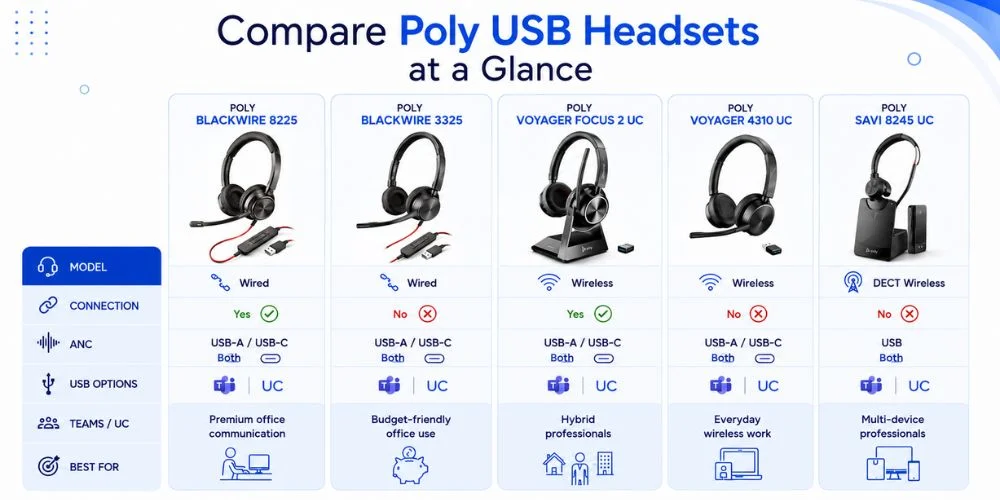
Compare Poly USB Headsets at a Glance
| Model | Connection | ANC | USB Options | Teams / UC | Best For |
|---|---|---|---|---|---|
| Poly Blackwire 8225 | Wired | Yes | USB-A / USB-C | Both | Premium office communication |
| Poly Blackwire 3325 | Wired | No | USB-A / USB-C | Both | Budget-friendly office use |
| Poly Voyager Focus 2 UC | Wireless | Yes | USB-A / USB-C | Both | Hybrid professionals |
| Poly Voyager 4310 UC | Wireless | No | USB-A / USB-C | Both | Everyday wireless work |
| Poly Savi 8245 UC | DECT Wireless | No | USB | Both | Multi-device professionals |
Should You Choose a Wired or Wireless Poly USB Headset?
This is determined by your daily work.
| Choose Wired If... | Choose Wireless If... |
|---|---|
| You work at one desk | You regularly move during calls |
| You don't want to charge a headset | You want more freedom |
| You need consistent plug-and-play reliability | You split time between home and office |
| You want maximum value | You prioritise flexibility |
The most trusted wired models are the Blackwire Series, which are used in office-based employees. The Voyager Series could be more advantageous to hybrid professionals, though.
Which Poly Blackwire Model Should You Choose?
In deciding between the two blackwire models above, it all depends on your work environment and budget.
| If You Need... | Recommended Model |
|---|---|
| Premium audio with ANC | Blackwire 8225 |
| Best value for office use | Blackwire 3325 |
| Frequent customer conversations | Blackwire 8225 |
| Budget-friendly deployment | Blackwire 3325 |
| Long daily meetings | Blackwire 8225 |
The two headsets are equally reliable and good quality in USB connection and commercial voice quality, but the Blackwire 8225 possesses more high-end features to fit high-performance business environments.
Why USB Headsets Are Better Than Standard Office Headsets
Not all headsets are business orientated. The headsets worn by the average consumers are all practical in the occasional calls, but lack the quality of microphones, comfort and compatibility with the working environment.
A special Poly USB headset has a number of benefits:
- Stable digital audio connection.
- Better voice call over the telephone.
- Quick plug-and-play setup
- Maximised compatibility with business communication software.
- Ergonomic ergonomic designs of extended working hours.
A USB headset is more reliable and productive in the daily lives of professionals who have to make a number of computer calls per day.
USB-A vs. USB-C: Which Connection Should You Choose?
It is important to be aware of the USB port of your computer before comparing the models of headsets. The right connector shall ensure that your headset is functioning soon after it is purchased.
USB-A
USB-A is the most widespread type of connector which is a rectangular one and is commonly available in desktop computers, docking stations and most office laptops. Unless your computer has this standard USB port, then a USB-A headset is the right choice.
USB-C
USB-C is the more recent, smaller connector that can be found on numerous modern laptops and business devices. It assists in preserving the identical stable performance and aligns with the existing hardware.
Poly USB headsets are available in USB-A and USB-C and this implies that companies are in a position to purchase the right type to suit their workstations without necessarily having to purchase adaptors.
Microsoft Teams vs. UC: Which Version Is Right for You?
Poly USB headsets come in a variety of Microsoft Teams and UC (Unified Communications) versions. The correct version would be based on the communicative software that your organisation is running on its day-to-day activities.
Choose Microsoft Teams If:
- Microsoft Teams are mostly used in your business.
- You desire a committed Teams button.
- Your main platform of collaboration is Teams.
Choose UC If:
- You regularly use Zoom
- You participate in Google Meet meetings.
- Your company is using Cisco Webex, RingCentral or any of the meeting systems.
Questions to Ask Before Buying a Poly USB Headset
Discuss the following simple questions before comparing individual products:
- Will you work predominately at a desk or be mobile during calls?
- Which type of headset do you like, wired or wireless?
- Does your computer have USB-A or USB-C?
- Which is your favorite meeting platform?
- What are your hours of headset use a day?
- Do you purchase a single headset or outfit a whole team?
By considering these factors initially, it will be much easier to select the appropriate model.
How We Ranked the Best Poly USB Headsets
To give our recommendations as objective as we could we rated the headsets in this guide on the same business-oriented basis. Unlike the approach of basing it on marketing claims, we have considered the attributes that are applied on daily basis by professionals.
| Evaluation Criteria | Weight |
|---|---|
| Voice Quality | 0.3 |
| Microphone Performance | 0.2 |
| All-Day Comfort | 0.15 |
| Connectivity & Compatibility | 0.15 |
| Build Quality | 0.1 |
| Overall Value | 0.1 |
This we have done according to official product specifications, compatibility, business use cases, intrinsic value. The method will assist the professionals in making comparisons on Poly USB headsets confidently and select the appropriate solution to their workplace.
Blackwire vs. Voyager vs. Savi UC: Which Poly Series Should You Choose?
Poly offers a wide range of USB headset families but each family is geared towards a particular professional. Such differences will help you narrow down on your selection and not waste money on the features that you may not even need by knowing them before comparing individual models.
| Series | Connection | Best For | Key Advantage |
|---|---|---|---|
| Blackwire | Wired USB | Office staff, call centres, desk-based professionals | Reliable plug-and-play performance |
| Voyager | Wireless USB | Hybrid and remote workers | Wireless freedom with professional audio |
| Savi UC | DECT Wireless + USB | Multi-device professionals | Connects to multiple business devices |
The Blackwire Series is frequently the most suitable option in case you spend the majority of your day behind a desk. Voyager is more adaptable and Savi UC may be employed in case mobility is an issue, and professionals that often switch between different communication tools may use it.
Which Poly Series Fits Your Work Style?
Instead of selecting the latest headset, select one that suits your working style.
| Yo Work Style | Recommended Series | Why It Fits |
|---|---|---|
| Customer Support | Blackwire | Reliable wired connection for continuous calls |
| Office Administration | Blackwire | Comfortable for full-day desk work |
| Hybrid Employees | Voyager | Wireless freedom between meetings |
| Remote Professionals | Voyager | Easy movement without disconnecting |
| IT Managers | Savi UC | Supports multiple communication devices |
| Executives | Savi UC | Flexible connectivity across office equipment |
Once you have the right series, you will need to pick the model which meets your needs in the best way possible.
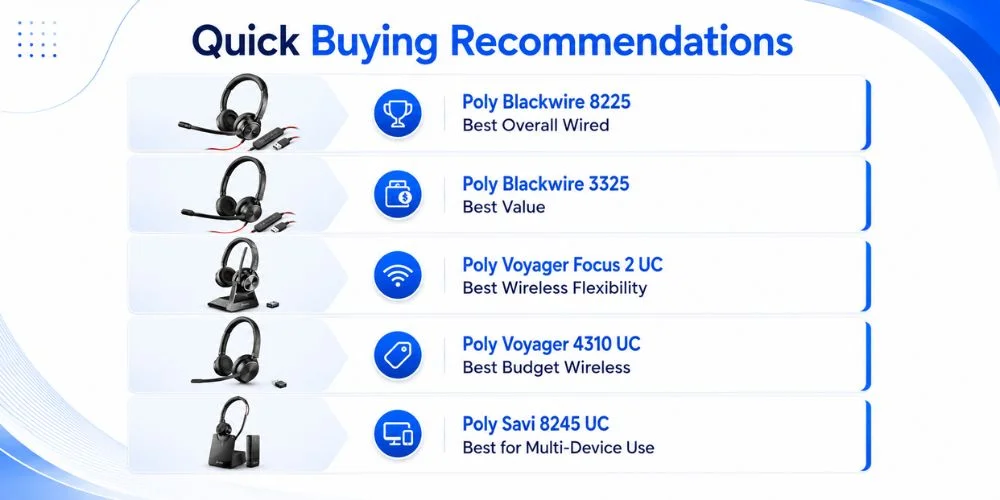
Quick Buying Recommendations
To assist you in the decision, the following is a simple buying guide:
- Select the Poly Blackwire 8225 in case you prefer the best wired headset in general with the best audio quality.
- Select Poly Blackwire 3325 when you want the best value when communicating in the office on a daily basis.
- Choose Poly Voyager Focus 2 UC when your priorities are the most significant on wireless flexibility.
- Choose the Poly Voyager 4310 UC when you would like to have a great wireless headset at a cheaper price.
- Select Poly Savi 8245 UC should you frequently alternate among a variety of communication devices.
Which Poly USB Headset Is Right for You?
You need not compare all the specifications but instead start with your daily routine of work.
| Your Priority | Recommended Headset |
|---|---|
| Best Overall Performance | Poly Blackwire 8225 |
| Best Budget Option | Poly Blackwire 3325 |
| Best Wireless Experience | Poly Voyager Focus 2 UC |
| Best Everyday Wireless Value | Poly Voyager 4310 UC |
| Best Multi-Device Solution | Poly Savi 8245 UC |
Almost invariably a superior long-term investment is made by selecting a headset based on how you really work.
How to Choose the Right Poly USB Headset
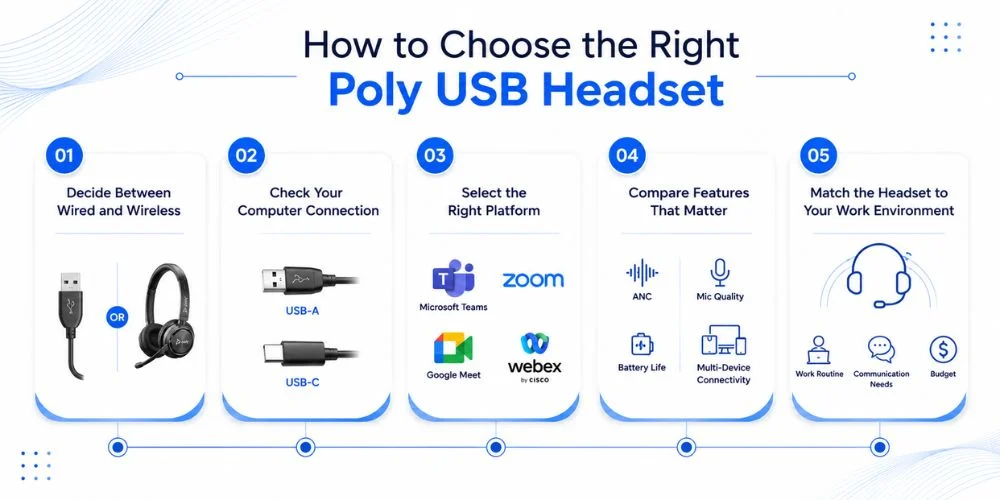
These five steps are simple to follow before you make your purchase:
Step 1: Decide Between Wired and Wireless
Select a wired model when you work at the desk or a wireless model when you move a lot when making calls.
Step 2: Check Your Computer Connection
Check the USB-A or USB-C of your device before ordering.
Step 3: Select the Right Platform
Use Teams as your primary communication system: Choose a Microsoft Teams version; Use Zoom, Google Meet, or Webex: Choose a UC version.
Step 4: Compare Features That Matter`
Consider about the features you will actually utilize such as ANC, quality of microphones, battery life or the capability to connect with other devices.
Step 5: Match the Headset to Your Work Environment
The best headset is not necessarily the most costly, but the one which fits your working routine, communication needs and budget.
Common Buying Mistakes to Avoid
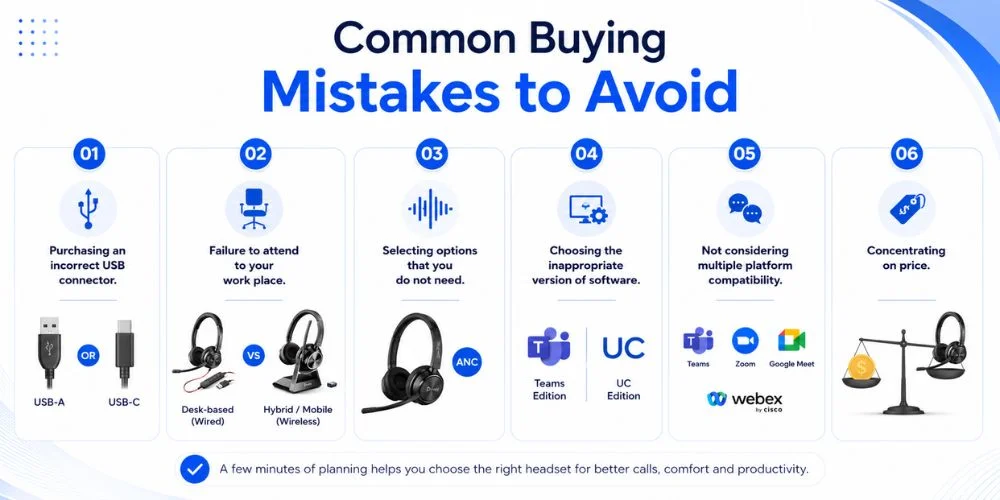
When buying a Poly USB headset, one should not just buy the highest rated one.
The right headset depends upon what you are going to operate, what equipment you are going to operate with and what communication platform your business is founded with. You can save time, money and frustration by preventing some of the widespread errors.
The following are the most frequent purchasing errors:
Purchasing an incorrect USB connector. When ordering, always make sure that your computer is either USB-A or USB-C.
Failure to attend to your work place. Wireless is more popular with hybrid employees and wired headset is usually more beneficial to a desk-based employee.
Selecting options that you do not need. ANC is a high-end feature that may come in handy in a busy office, but may not be needed in a less noisy environment.
Choosing the inappropriate version of software. When choosing the edition, in case you work with Microsoft Teams as the primary tool in your organisation, pick the Teams edition.
In case you operate in more than one communication platform, UC version is normally the more preferable one.
Concentrating on price. When the cheaper headset does not match your day to day communication needs, then it is not the most sufficient headset.
By spending a few minutes to consider these points prior to making a purchase, you can purchase a headset that will be more effective in the long-term.
Why Professionals Trust FindHeadsets
At FindHeadsets, we think that it should be easy and knowledgeable to purchase a business headset. This is what makes our recommendations grounded on reality needs at the workplace and not mere marketing claims.
Each of the headsets provided in this guide has been put through the same parameters, including voice quality, microphone performance, comfort, compatibility, quality of construction and business value.
We also consider how the different models could be applicable to different workplace environments such as customer service departments and office workers, hybrid employees and remote workers.
We are going to assist businesses to make comparisons of products and select the appropriate communication solution to use in their teams.
In case you are still comparing various product families, our guide to the Best Poly Headsets for work calls is a more extensive comparison of Poly business headsets.
Final Verdict
The perfect Poly USB headset for computer calls will be based on your workplace and location. Despite the fact that Poly Blackwire 8225 is the most appropriate that can be used by desk-based professionals, the rest of the models in the line are customized to fit different needs in the workplace.
Blackwire 3325 will be a good option in case you desire a good wired headset but at a lower price. Voyager Focus 2 UC or Voyager 4310 UC can be suggested to those professionals who must be able to move during the call, and Savi 8245 UC is most appropriate to those who must use different business gadgets.
By combining your alignment of your headset with your place of work, the kind of connection you prefer and the platform of communication, you will not only invest better long term, but also experience more enjoyable calls every day.
FindHeadsets has a broad range of Poly USB Headsets, thus you can compare the models and identify the best headset to meet your business communication needs.
Frequently Asked Questions
What is the best Poly USB headset for computer calls?
Our overall best recommendation is the Poly Blackwire 8225. It provides great voice quality, Active Noise Cancellation, and comfort all day long, and is perfect to use by professionals who make many hours of computer calls.
Which Poly USB headset offers the best value?
Poly Blackwire 3325 offers the most affordable and performance balance. It's a reliable option for everyday office communication without the cost of premium features.
Which Poly USB Headset Is Best for Microsoft Teams?
Poly Blackwire 8225 is the best Poly USB headset in Microsoft Teams, which provides high-quality call, comfort throughout the day, and Teams version. The Poly Voyager Focus 2 UC is an excellent option to wireless users, whereas the Poly Blackwire 3325 offers stable Teams performance at a lower cost.
Which Poly USB Headset Is Best for Remote Work?
Poly Voyager Focus 2 UC is the ideal Poly USB headset to work remotely due to its wireless feature, clear microphone, and extended comfort. In case you would like to have a wired headset, the Poly Blackwire 8225 is also a reliable product to use in making professional computer calls at home office.
Can Poly USB headsets work with Zoom and Google Meet?
Yes. Poly USB headsets are UC versions that can be used with most popular communication platforms, such as Zoom, Google Meet, Cisco Webex, RingCentral, and numerous other Unified Communications applications.
Should I choose a USB-A or USB-C headset?
Select the version that is compatible with your computer. USB-A is used in older desktops and in most office laptops, whereas USB-C is commonly found in newer laptops.
Are Poly USB headsets compatible with Windows and macOS?
Poly USB headsets are compatible with Windows and MacOS. When buying a product, it is always important to check the specifications to ensure that it is compatible with your device.
Is the Poly Savi 8245 UC suitable for computer calls?
Yes. Although it is intended to be used by professionals who operate numerous communication devices, the Savi 8245 UC also provides great performance regarding computer-based calls and online meetings.
No comments yet. Be the first to comment!
Leave a ReplyYour email address will not be published. Required fields are marked *