
Wireless communication headsets have become a must in the business world today. This headset allows you to enjoy the freedom of movement both in the workplace and during business calls or virtual meetings, and can be used in a call center or for listening to music.
Get simple explanations of How Wireless Headsets Work in Simple Terms, how they transmit and receive audio, and the technologies that they use, as well as why they are one of the most reliable communication tools for personal and professional use.
Whether you are buying your first headset or you just want to know about all of the technology, it is the guide to understand it.
What is a Wireless Headset?
A communications device that enables you to talk and hear through a microphone without any wires. It transmits sound wirelessly to your phone, computer, desk phone, or other compatible device, instead of using wires.
The typical wireless headset comes with the following components:
- Speakers(earpieces) to listen to sound
- In-built microphone for voice-to-voice communication.
- A rechargeable battery
- Wireless communication hardware
Call management control buttons, volume control buttons, and mute control buttons.
Most of the modern headsets also have additional features like active noise cancellation (ANC), environmental noise cancellation (ENC), multipoint connectivity, voice assistant, or all-day battery life to make it even easier to use on a daily basis.
How Wireless Headsets Work in Simple Terms
Understanding the operation of wireless headsets is just the first step in deciding which is the best solution for professional communications; other factors like range, comfort, connectivity and workplace requirements come into consideration.
Rather than cable, your voice and what you hear is converted to digital signals and sent wirelessly between the two devices. All of these take place in a split second with natural and effortless conversations.
Let's take a closer look at how this works in steps.
Step 1: Speak into the Microphone
The microphone in your wireless headset will pick up your voice in the form of sound waves. The sound waves are much like the vibrations that are made when individuals talk.
Computers and smart phones can't read sound waves as is. Rather, they require digital information.
That is why the headset has an inbuilt audio processor which will digitise your voice on the spot. The conversion process is very fast and you will not be able to detect any delay.
Step 2: Your Voice is Converted into Digital Signals
Your voice is captured and the headset analyzes it into thousands of tiny pieces of digital data.
In this phase, many contemporary wireless headsets also enhance your voice quality through technologies like:
- Background noise reduction
- Echo cancellation
- Voice enhancement
- Wind noise filtering
These features can help ensure that the person you are talking to can hear you, even when you are in a noisy home, in an office with background noise or out of the house. The clearer the sound prior to sending, the clearer the call will be.
Step 3: The Headset Sends the Signal Wirelessly
Your voice is then converted into digital data and wirelessly sent to your device by a headset.
This transmission is usually done through one of the following:
- Bluetooth technology
- DECT wireless technology
A special USB wireless adapter is required for each device.
No cable is used for transmitting the information, only low-power radio waves.
It's very technical and happens almost instantaneously. The latency is minimal so that people can have a conversation without any awkwardness while on calls, meetings, or video conferences.
Step 4: Your Device Receives the Audio
When the signal is received, the receiving device decodes the digital information.
Then it knows what you say and passes your voice on to the other party in a telephone call or online meeting.
This is all happening continuously as you communicate via apps like Microsoft Teams, Zoom, Google Meet, or any other communication app.
The same applies, of course, when the other person responds.
They convert their voice into digital signals and transmit them wirelessly back to your headset and then back to your head through the headset speakers almost instantaneously.
Step 5: You Hear the Other Person Clearly
As long as someone is talking, his voice is also transmitted to the headset, but on the same wireless channel.
The headset takes in the digital signal, and the sound is converted back to an audible sound. This takes place within a few milliseconds and makes conversations natural and uninterrupted.
Today's wireless headsets also feature high-tech sound technologies that enhance the sound you hear, such as:
- High-definition (HD) audio
- Wideband speech
- Noise reduction
- Automatic volume adjustment
- Digital signal processing (DSP)
These features help to create clearer voices, minimize distractions and make long conversations more comfortable.
The Process Feels Instant
Many first time users don't notice any delay when using these headsets. The answer is that the wireless technologies of today are extremely speedy.
The Bluetooth headsets and DECT headsets of today have very low latency and almost no delay between talking and listening.
With these and advanced sound processing, you can enjoy reliable, real-time communication – from business meetings to customer support calls.
To most users, it's as user-friendly as a wired headset, and you can move around without carrying a cord.
How Far Can a Headset Work?
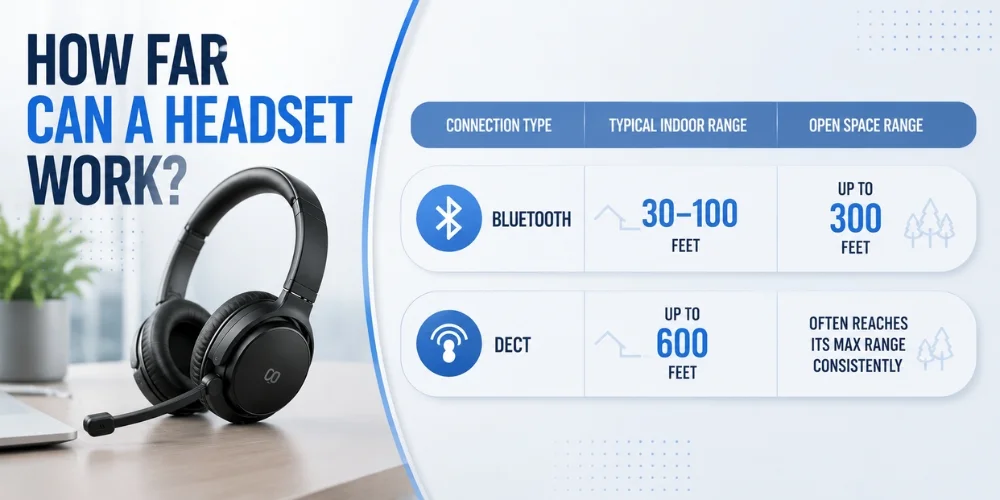
The ability to move around without losing touch is one of the greatest benefits of using a wireless headset. However, with each wireless technology, there is a range. In summary: A general comparison:
| Connection Type | Typical Indoor Range | Open Space Range |
|---|---|---|
| Bluetooth | 30–100 feet | Up to 300 feet (depending on version and device) |
| DECT | Up to 600 feet | Often reaches its maximum range more consistently |
Please note that these are approximate numbers. Actual performance will vary according to the model of the headset and the environment.
Common Features in Modern Headsets
These headsets today are a lot more than just wireless audio. These are some of the most useful features that are available.
| Feature | What It Does |
|---|---|
| Active Noise Cancellation (ANC) | Reduces outside noise while listening |
| Environmental Noise Cancellation (ENC) | Makes your voice clearer during calls |
| Multipoint Connectivity | Connects to two devices at the same time |
| Mute Button | Instantly turns off your microphone |
| Busy Light | Indicates when you're on a call |
| Voice Assistant Support | Works with Siri, Google Assistant, or Alexa |
| Touch Controls | Lets you answer calls and adjust volume with simple gestures |
| USB Wireless Adapter | Provides a stronger and more stable computer connection |
These features help to enhance comfort, productivity and general communication, particularly for those with a high number of calls on a daily basis.
Are They Secure?
For organizations that handle sensitive data, security is a key consideration. Luckily, contemporary wireless headsets come with security built-in.
The technology relies on encryption, such that the information sent is extremely difficult to spy on by third parties.
Additionally, business-class headsets frequently feature some of the most sophisticated security features such as:
- Secure pairing
- Encrypted voice transmission
- Protected wireless connections
Users can automatically log in to trusted devices. Plus, the latest security patches and enhancements are retained.
How Long Does a Headset Battery Last?
The battery life depends on the model of the headset and its usage. A lot of quality business headsets have enough power for an entire work day and even more power for music playback for some consumer headsets.
Here are some general ideas of what to expect:
| Usage Type | Typical Battery Life |
|---|---|
| Talk Time | 8–24 hours |
| Music Playback | 20–40 hours |
| Standby Time | Several days to weeks |
Some features like Active Noise Cancellation (ANC), volume up, and live video calls consume extra battery power.
How Wireless Headsets Recharge
A wireless headset is easy to charge. Most of the existing models offer you the option to utilize one of them:
- USB-C charging
- Micro-USB charging (earlier versions)
- Includes charging dock/base station.
- Magnetic charging cable
Also, there are some high-end ones that can be fast charged that can provide a few hours of talking time after a brief charge.
How to Choose the Right Headset
What is right for one person may not be right for another. The decision on which one to choose is based on how you intend to use it, the nature of your work and what you are looking for in a feature.
Consider features that can improve your daily communication, comfort and productivity, rather than the cost.
For Remote Workers
If you are in online meetings, video calls or online collaboration the majority of your day, then choose a headset that will work well and be comfortable for the entire day.
To search for characteristics such as:
- Clear microphone quality
- Long battery life
- Comfortable ear cushions
- USB adapter compatibility
- Noise cancellation
- Super easy to integrate with meeting platforms.
Many Jabra models, including the Jabra Evolve2 65 Stereo, have a reputation for reliable wireless connectivity, clear microphone performance, and ergonomic design for long calls, making them a favorite among remote professionals.
For Office Professionals
A reliable wireless office headset can enable employees to be connected and productive in today's busy office. Companies will want to look for headsets that suit their needs for the type of communication they will need to make on a regular basis, as well as for moving around and calling people.
- Important features include:
- DECT wireless technology
- Extended wireless range
- Busy light indicators
- Multi-device connectivity
- Comfortable all-day design
- Advanced noise reduction
Professional office solutions like the Jabra Engage 65 Mono are targeted to business users that require secure wireless communications, long range and reliable calls all day long.
For Everyday Users
If you only need to use the headset for voice communications, music, streaming and perhaps short video calls, Bluetooth headsets might be the most convenient.
Consider features like:
- Easy pairing
- Lightweight design
- Good battery life
- Multipoint connectivity
- Fast charging
When it comes to audio clarity, comfort, and reliability in your daily communication, these are the things you should consider, like the Jabra Evolve2 30 SE Stereo.
For Frequent Travelers
Travelers should have wireless headsets to wear which are lightweight and offer high-quality sound and call performance.
The top travel headset should have the following features:
- Foldable design
- Compact carrying case
- Active noise canceling (ANC)
- USB-C fast charging
- Long battery life
You should know the Complete Guide on Wireless Headsets, and always take your primary use case into account before choosing a wireless headset.
Note: If the headset is for office use, you may not want to travel with it and a light version of the Bluetooth headset may not be suitable for use in the office.
Final Thoughts
It is not necessary to have technical knowledge to understand How Wireless Headsets Work in Simple Terms. These devices record your voice, digitize it, and transmit the recording via a wireless DECT or Bluetooth system so you can wirelessly communicate instead of with wires.
That's the same way around when transmitting audio, with smooth, real-time conversations as the result.
Whether you're in an office, receiving calls from customers or having video conferences, or playing music, wireless headsets provide greater flexibility, comfort and convenience than wired headsets.
They also feature modern technology like multipoint pairing, secure wireless connectivity, extended battery life and noise reduction, which make them capable of use in both the personal and business worlds.
Knowing the basics of wireless technology, battery life, connectivity and audio quality will help you get ready to make a selection that suits your needs.
Need Expert Help?
For any queries regarding wireless headsets, technical support or to buy the right wireless headset then it is best to get in touch with Find Headsets. We're here to help you choose the best headset for you and provide expert advice both before and after the purchase.
Frequently Asked Questions
What are wireless headsets?
Wireless headsets convert the voice and audio input to a digital signal and then transmit the voice and incoming audio to the headset via a wireless signal, either Bluetooth or DECT, rather than through a wire.
Are wireless headsets capable of being used with multiple devices?
Yes. Most of the new ones are multipoint connected - meaning they can be designed intelligently and cleverly connected at 2 points, such as between a laptop and a cell phone.
Which one is better, Bluetooth headsets or DECT headsets?
The Bluetooth standard is often employed with personal devices such as cell phones and laptops, whereas DECT is geared toward business applications, where distance and voice quality are important.
What is the battery life of wireless headsets?
Today's wireless headsets have a talk time range of 8 to 24 hours, and some will last even longer as music is played, depending on the model.
For business calls, will it be good?
Yes. Business wireless headsets are built for business use and offer really top-quality microphone quality, noise cancellation, and wireless.
No comments yet. Be the first to comment!
Leave a ReplyYour email address will not be published. Required fields are marked *