
 By
By Wireless headsets are becoming more and more popular among professionals. These headsets allow the user to move freely without losing connection. Also, without the cables, the table setup remains mess-free.
For different working styles, be it remote work, hybrid, or onsite, the cordless headsets prove to be valuable for everyone. Even the call center workers are shifting towards using such headsets. People from all professions prefer such headsets due to their comfort and productivity.
In this guide, we discuss everything you need to know about professional wireless headsets, be it how they work, the different technologies, wearing styles to choose from, and comparisons among different models. At the end, you’ll also find tips for finding a great headset and how to resolve the common issues related to cordless headsets. Keep scrolling to find the information you need.
How Wireless Headsets Actually Work
As the name suggests, these headsets do not require a cable for connection. Instead, they use smart technology to pair with your device. It can be Bluetooth, DECT, or USB connection.
The wireless headsets contain a battery that powers the device. Battery life varies by model. Some last for 7hr others can last for 24 hr or more. Some of the professional headsets also come with charging docks, which makes it convenient to recharge the headsets.
One of the features that makes cordless headsets more in demand is their multi-connectivity. At the same time, they can stay paired with devices such as a PC, a cell phone, and a desktop.
There are various technologies that are used for establishing a connection between devices in wireless headsets, and understanding the process is easier to select the best headset. How Wireless Headsets Work in Simple Terms teaches users about wireless connections, battery usage, pairing options, and how these headsets work with various devices.
Types of Wireless Headsets
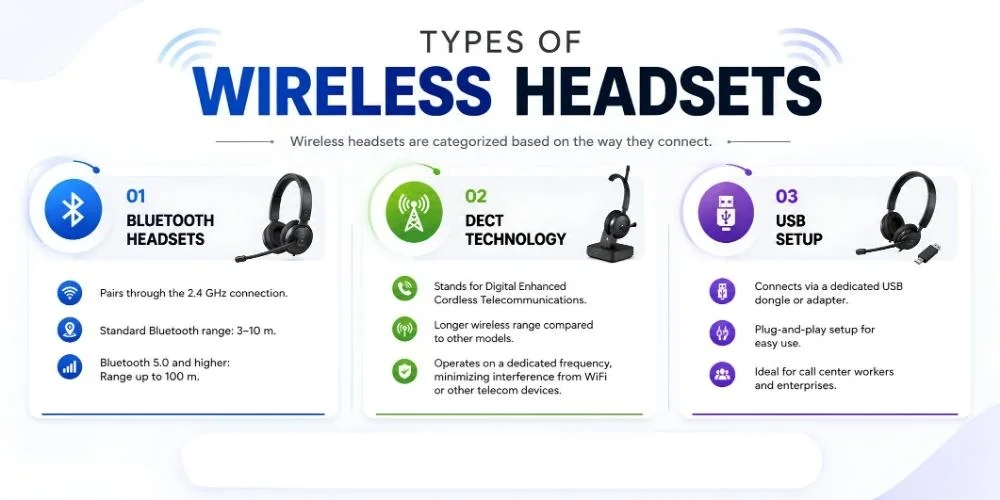
Now let's talk about the technologies that establish the connection between your headphones and the device. The wireless headsets are categorized based on the way they connect. These types are mentioned below:
Bluetooth Headsets
One of the most popular options for remote workers and daily users is the wireless bluetooth headset. It pairs through the 2.4 GHz connection.
The standard Bluetooth has a range of 3-10 m. This means that you can walk around in the house without losing connection. The 5.0 and higher technology have more range that lasts up to 100 m.
DECT Technology
It is the abbreviation of Digital Enhanced Cordless Telecommunications. This is a wireless technology that is specially designed for clear communication for professional purposes.
The DECT wireless headsets have a longer wireless range as compared to the other models. Since these headsets operate at a dedicated frequency, there is less chance of interference by other networks, such as WIFI or signals from telecom devices. That is why professionals prefer the headset with this technology.
USB Setup
Another popular type used by professionals is wireless USB headsets. They connect through the dedicated USB dongle or adapter. Some even come with a plug-and-play setup. As there is no complicated setup required for establishing a connection, that is why call center workers and enterprises consider these headsets.
Each of the technologies has some of its own benefits to offer. The choice of selection depends upon your particular need.
USB Vs.Bluetooth Vs. DECT Wireless Headsets Comparison
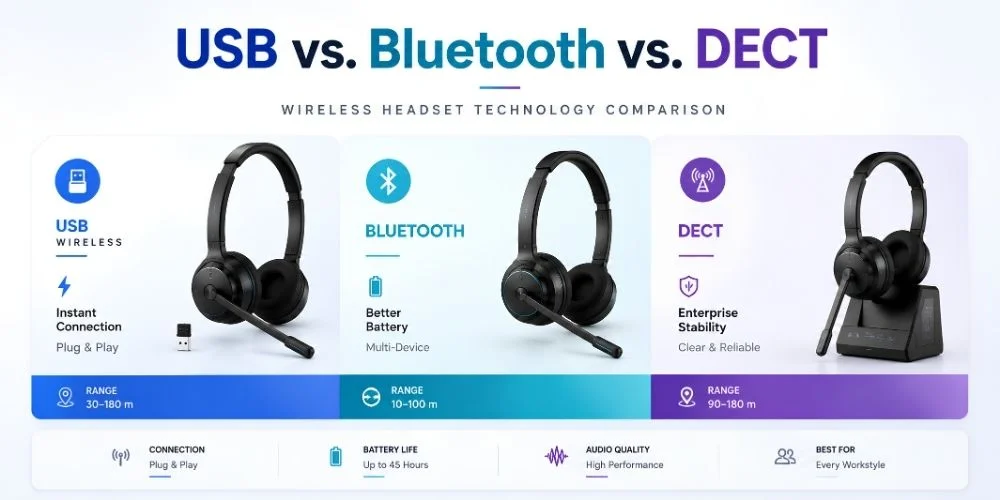
All three of these three technologies for office wireless headsets prove to be valuable for different purposes. The USB one provides an instant connection. The Bluetooth has better battery life, and DECT models provide the most stable and clearest audio. Here is the comparison between the different features of these headsets.
| Feature | USB Wireless | Bluetooth | DECT |
|---|---|---|---|
| Connection Type | USB RF Dongle | Bluetooth 2.4 GHz | Dedicated 1.9 GHz RF |
| Setup | Plug and Play | Pairing Required | Base Station Required |
| Range | 30-180 m | 10-100 m | 90-180 m |
| Multi-Device | Single Device Only | Yes, 2-3 Devices | Limited by Model |
| Interference | High (2.4 GHz) | Medium (Frequency Hopping) | Very Low (Dedicated) |
| Audio Quality | Highest Bandwidth | Medium (Some Latency) | High (Voice Optimized) |
| Best For | PC-Based Workflows | Mobile, Hybrid Workers | Call Centers, Offices |
| Compatibility | PC, Mac, Consoles | Phones, Laptops, Tablets | Desk Phones, PCs |
| Battery Life | 20-45 Hours | 20-40 Hours | 8-12 Hours |
The above table shows the standard comparison. Each of the models offered by different brands and variants have their own features. When you buy, always make sure to check out the specifications.
There are various types of wireless headsets and each support a particular set of needs. By knowing the difference between USB Wireless vs Bluetooth Headsets, users can make informed decisions regarding set-up options, connection stability, compatibility, and performance before choosing a headset for their professional or personal needs.
Wireless Headset Range and Connectivity Explained
The wireless range for the headset refers to the distance at which the connection can be maintained. It depends on the technology used as well as the environment.
These wireless technologies are all intended for different users. For mobility, Bluetooth works best, for speedy setup, USB is great and if you need stability in a professional setting, DECT is perfect. To make the right choice of the technology that suits your daily working routine, it is important to know the Wireless Headset Range and Connectivity.
The Bluetooth devices have a wireless range between 3 and 100 m. However, the presence of walls, other devices, and an open environment can interfere with the signal. They mostly suit remote workers. When it comes to USB devices, their range is much higher. It can be anywhere between 30 and 180 m.
The DECT headsets have the longest range. It is between 90 m and 180 m. Since the connections are secure and reliable, there is less chance of signal loss due to walls, devices, and other factors. That is why large enterprises prefer the use of such a model.
Mono Or Stereo Wireless Headsets: Which One to Choose
The wireless headsets come with different wearing styles. One is a mono headset. It comes with a single earpiece. It feels lighter on the head. With the help of such a style, you can stay aware of your surroundings while responding to the calls.
The other one is a stereo wireless headset. It comes with the standard two earpieces. Such modes allow you to stay fully focused on the calls.
Now the choice depends on your work style. If you want to take meetings and perform work side by side, then mono wireless headsets are the top recommendation. On the other hand, if you want to stay fully immersed in the communication, then the better option is to choose a stereo headset.
The Difference Between UC and M variants:
You’ll come across the terms UC and M mentioned along with the headset model. The UC means that the headset is certified to be used with the unified communication platforms. This includes Cisco, Google Meet, Zoom, Teams, and others. The communication is delivered well, and the call control buttons work perfectly fine with such platforms.
The M variant is the one that is particularly designed for Teams. It is officially certified by Microsoft. The wireless microsoft headsets come with a dedicated button that manages the settings on this particular platform.
If your main source of communication is through Teams, then the M version should be your top choice. Otherwise, UC wireless headsets are a good option for multiple platforms.
The type of headset you select can affect levels of comfort and productivity. Some prefer to be aware of what's going on around them, others need total concentration during calls. The comparison of mono vs stereo wireless headsets can enable you to see which one is better suited to your environment and the way you communicate.
Best Wireless Headsets for Work and Communication
Let's see where you can find the best wireless headsets. There are many brands that offer great models. But the following are the top brands that offer quality models:
If your work style is remote, then you can consider Poly Voyager Focus 2 headsets. If you're in need of a mono headset for work, you can consider the Jabra Evolve2 65 stereo. Another great option is Yealink WH67. Besides that, Sennheiser SD Pro 2 is another great option.
Certification is crucial, but it shouldn't be the only factor in assessing the best headset for you. Other features, such as microphone quality, battery life, wearing comfort, and device compatibility are also a big part. With these in mind, it's much easier to compare the best wireless headsets for work and communication before making your final decision.
Cheap VS. Premium Wireless Headsets Comparison
The cheap headset may be under the budget, but they may lack special features which the premium headsets have. The under budget headsets can offer audio and a boom mic, but they may not cancel out the background distraction sound. However, premium headsets are built with a noise-cancelling mic. Some of the models even come with active noise cancellation, which blocks the unwanted noise and lets you stay focused on work.
Even the compatibility across multiple unified platforms matters. The cheap headset might not work properly across platforms like Zoom, Teams, or Cisco. On the other hand, premium headsets come with proper certification and compatibility across a wide range of platforms.
If you want to use headsets daily or for personal use, then cheap ones can be great. Otherwise, if you are a professional, then it is highly advised to invest in premium wireless headsets.
Each professional will have a variety of requirements, and not all of the more costly headsets will be suited to each individual user. If you compare the cheap vs premium wireless headsets, you can learn which features are a worthwhile expense and which are not needed for everyday office work.
Wireless Headsets Buying Guide for Beginners
If you are having trouble about how to pick the wireless headset model for purchase, here are some of the guidelines to consider:
Buy from trusted brands: The brands like Poly, Jabra, Yealink, and others offer some of the best wireless headsets. Make sure to search the brand name before you buy the item.
Look for specifications: Not all wireless headsets have the same features. Every model and variant has its own specification. Try to go through all the product descriptions before purchase.
Check Compatibility: Some headsets may work with PCs, some with deskphones. Each headset has different compatibility. Always be sure to confirm that.
Choose Lightweight Design: Comfort matters a lot, as heavier headset can cause headaches and discomfort. Make sure that the headsets come with ear cushions and adjustable headbands.
Select Based On Activity: Some headsets are targeted at call center workers, such as the Encorepro series by Poly; others are meant for office workers or gamers. Always make sure that the headset you are buying offers features for your needs.
Compare Prices: You can set out your budget and compare the prices of multiple models in your range. At Findheadsets you'll find both premium and affordable headsets.
You can follow these simple guidelines in order to choose the perfect model, be it for professional, gaming, or everyday use purposes.
When choosing a wireless headset, you need to be aware of the connection method, compatibility, battery life, comfort, and usage. This Wireless Headsets Buying Guide For Beginners outlines the essential factors to keep in mind when buying a wireless headset for office, remote work and professional communication.
Common Wireless Headset Problems and How to Fix Them
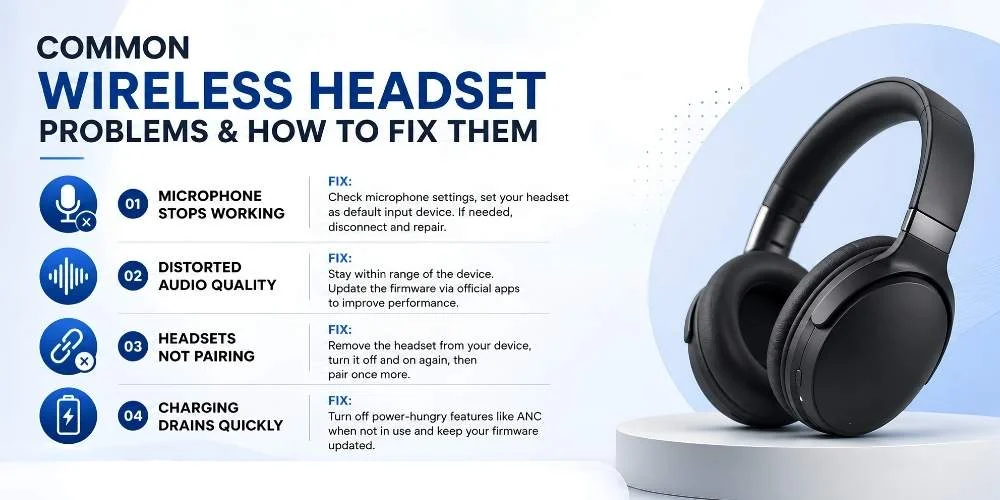
A lot of people have concerns about the connectivity of wireless headsets. But the great news is that these issues can be easily resolved. Here are some of the common challenges encountered by users around the world
Problem 1: Microphone Stops Working
Sometimes it may happen that the microphone stops responding even if the wireless headsets are connected.
Quick Fix:
Go to settings and check if the microphone functions are enabled. See if the headset is selected as the default input device in the OS. If all that does not work, you can disconnect and then pair the headsets again.
Problem 2: Distorted Audio Quality
It may happen that your headset is properly connected and charged, but you still get to hear poor-quality audio.
Quick Fix
Make sure that your device is at distance within the range of the headset. You can also update the firmware through online apps. Doing this usually resolves the issue.
Problem 3: Wireless Headsets Not Pairing
Usually, it happens after the update that the headsets do not get paired with your device, even if showing connected.
Quick Fix
To solve this, you can disconnect your model and remove it from your device. Turn the wireless headset off and then on again. Now you can again pair your headset. This time it will definitely connect.
Problem 4: Charging Drains Quickly
For some users, it happens that the battery drains much more quickly than expected, and they have to charge the headset again and again.
Quick Fix
It happens when you keep using advanced features all the time. You can switch off features like ANC, and adaptive noise-cancelling mic, and other ones when not in use. It is also important to keep the headsets up to date with firmware updates.
In short, every problem has a simple solution. If you ever encounter a problem with your headset, don't think that it is malfunctioning. Just some simple troubleshooting tips can help you solve the issues.
Sometimes even a good wireless headset may have connection, charging, pairing or sound quality problems. By understanding Common Wireless Headset Problems and How to Fix Them, users can easily troubleshoot common problems and ensure optimal headset performance.
Final Recommendation
Wireless headsets are a must-have for people who prefer a stable connection and freedom of movement. Always make sure to choose the model with the right technology and the specifications that you require for your task. Before purchase, make sure to compare prices, check compatibility, battery life, and wireless range. Instead of generic models, choose the cordless headsets from the top recognized brands. Do not be reluctant to invest in premium headsets as they provide quality features and last for years. If you face any problem with your gear, then know that a quick solution is always available.
If you need more info, tech support, or to purchase the model, feel free to contact Find Headsets for support.
No comments yet. Be the first to comment!
Leave a ReplyYour email address will not be published. Required fields are marked *