
When shopping for professional audio gear, understanding the engineering and heritage behind Jabra changes the perspective. Long before modern virtual meetings and the hybrid trend, Jabra's parent company, the Danish giant GN Group was founded in 1869 as the Great Northern Telegraph Company. Connecting Europe and Asia with telegraph lines.
Jabra was originally founded in the United States in 1983 by inventor Elwood Norris. Jabra built its early reputation on advanced mobile communication before being acquired in 2000 by GN Netcom. This powerful merger led Danish acoustics to industry milestones like the world’s first Bluetooth headset.
With a 150-year legacy, the Jabra ecosystem is purposely designed to solve specific workplace communication hurdles. Whether you need flexible mobility of the Jabra Evovle series for modern hybrid offices. The wireless DECT range of the Jabra Engage family for high volume customer support floors. Everything you need to upgrade your workspace, Jabra is the immediate solution for all of your needs.
Before diving into a specific series, feel free to explore our complete range of Jabra headsets to see what options fit your workflow. To select the best option, you need to weigh several critical variables. Your physical environment, the way you wear your headset, your software collaboration ecosystem, your call volume and how much you move around.
How Jabra Headsets Back Professional Environments
The standard consumer earbuds rarely hold up when you are spending hours daily on client calls or official meetings, standard consumer earbuds rarely hold up. Sometimes the battery goes off or at other times sound distortion. Enterprise communication requires tailored engineering design to keep the business moving smoothly.
Microphone Clarity: Advanced noise isolating series filters out background room sounds so callers hear your voice clearly and give you an in-person conversation experience.
Workplace Adaptability: Jabra offers headsets for different types of work environments. Whether you work remotely, sit in a work-loaded open office, or handle bundles of calls in a call centre, there are headsets designed specifically for each work requirement.
Platform Alignment: Some Jabra headsets are designed to work smoothly with communication platforms such as Microsoft Teams (MS) and other Unified Communication (UC) systems. You can choose your headset model made specifically for Teams or a standard UC version.
Connection Variety: Jabra headphones come with different connectivity options so you can pick according to your needs or workflow. Wired USB models are simple to use when you are not roaming around. Bluetooth models allow you to move freely with no restrictions. If you need a longer wireless range, DECT headsets are designed for this.
Comfortable Design: Comfort is the first thing when you wear a headset daily for long hours. Jabra provides different designs where you can find on-ear and over-ear options with cushioned earcups. It allows you to choose the style that is comfortable for your daily routine.
Indicator and Control: Small features of Jabra headsets make a noticeable difference in a busy workplace. Different series include busy lights that help you to let people know when you are on a call and avoid interruptions. Physical buttons make it easy to attend or end a call and manage other functions.
The Main Jabra Series Available
Jabra Headset platform is built for visible user profiles and office setups. Jabra offers various series to meet the different needs of its users, work environment and communication requirements. Instead of just focusing on price and features, understand the nature of your work. Choose what fits best with your needs. Some series prioritise hybrid collaboration when others focus on call centres and personal productivity. Each lineup also differs in connectivity options and compatibility. Comfort and advanced features like Active Noise Cancellation and wireless range are exceptional. The section given below describes the Jabra Series to help you understand and choose which family suits your needs. Knowing how the primary series differ will save you hours of second guessing.
Evolve Series of Jabra
The Jabra Evolve Series fulfils your everyday office professional needs with dependable voice quality for office calls or video meetings. Suitable for office setup and hybrid environments. Jabra Evolve 65 SE Stereo and Jabra Evolve 65 SE Mono gives you dual connectivity and long battery life. This headset series is made of professional microphone with comfortable design. The series includes wired and wireless models, giving freedom to choose according to their workspace requirements. Busy lights on selected models and compatibility with leading platforms. The Jabra Evolve series offers a practical solution for individuals and teams who want reliable performance.
Evolve2 Series of Jabra
With the need for hybrid offices and remote workers, this series removes the gap between wired reliability and wireless freedom. Jabra Evolve2 30 SE Mono and Jabra Evolve2 30 SE Stereo is budget friendly and gives you reliable communication. This Jabra family is designed for professionals who divide their time in the office and at home and keep on roaming for work. These headsets give you excellent call quality, comfortable all day long wear and advanced features. Whether you are looking for a pocket-friendly headset or a premium model with Active Noise Cancellation, the Jabra Evolve2 lineup gives you a wide range of options for business needs.
Engage Series of Jabra
Built for heavy call environments like sales floors and customer service hubs, the Jabra Engage series masters every aspect. It gives you exceptional voice clarity and is comfortable to wear for long hours. Most models like Jabra Engage 75 SE Stereo/Mono provide extended wireless connection. It gives you freedom to move without compromising the sound quality. Their professional grade microphones and advanced call management features make them a reliable choice for busy communication focused offices.
Evolve3 Series of Jabra
Tailored specifically for modern and flexible work lifestyles, the Evolve3 line handles a mix of calls, collaborative video meetings and focuses on battery timing. These models offer the user varying features of performance and wearing styles to keep their daily schedule on pace. Jabra Evolve3 65 Flex gives you a foldable design and premium comfort.
Biz Series of Jabra
A reliable choice for offices that depend on wired and fixed station connections for consistent call quality. Available in both Mono and Stereo wearing styles. They allow users to choose between staying connected to the environment or avoiding all sorts of distractions. With durable construction and simple connectivity, these headsets are the best fit for businesses that seek simplicity and reliability. Jabra Biz 2300 Duo and Jabra Biz 2300 Mono is known for its excellent voice quality and comfort.
Choose a Jabra Headset Based on How You Work
Before you look for your Jabra headset, you should understand the nature and requirements of your work. Jabra’s various series are designed for various users, each giving you specific connectivity options and compatibility. We did the homework for you and summarised everything to save you time.
Best Jabra Headsets for Office Professionals
When your daily schedule revolves around back to back virtual conference rooms and client catch-ups, finding the right audio gear is necessary. You need a set-up that prioritises a crystal clear microphone to cut through meeting fatigue and combine with a comfortable fit design. Having easy to access Microsoft Teams or Unified Communications controls just under your fingertips boosts your workflow. Explore our Jabra series to find the best fit for your needs.
Best Jabra Headsets for Hybrid Work
Rotating between your home workspace, coffee shops and the corporate office brings unique daily challenges. Hybrid and remote professionals require absolute portability so it fits effortlessly into a backpack or bag. Reliable laptop and mobile connectivity are non-negotiable. The battery timing that stays with you through the whole day. The ability to switch between your laptop and mobile phone without missing a beat keeps productivity high.
Best Jabra Headsets for Call Centres and Customer Services
Customer support environments and sales floors demand equipment built for tolerance and high volume calling systems. To make sure every customer interaction is crisp, professional and free from miscommunication, the agents need exceptional call clarity. Depending on the office floor setup, teams can choose a wired connection for desk work or a DECT connection for mobility.
Best Jabra Headsets for Open Office Environment
Working in a bustling open plan environment means dealing with constant ambient chatter, ringing phones and unnecessary distraction. You need advanced microphone noise reduction that filters out background room sound before it reaches your callers. Active noise cancellation helps reduce surrounding noise distractions for the user to maintain focus. Immersive stereo and over-ear design create an acoustic barrier. Integrated busylight signals to colleagues when you are on the call. Learn how to protect your concentration by exploring the Best Jabra Headset for Noisy and Open-Plan offices cluster.
Best Jabra Headsets for Desk Phone Services
Routine office desk setups and enterprise telephone systems need dedicated hardware solutions. Users moving from analogue systems need reliable desk phone compatibility, wide wireless range and base station layout. If you want to ensure seamless communication, matching the right infrastructure between DECT technology and standard Bluetooth is essential.
Best Jabra Headsets for Managers
Modern managers do not rely on just one machine. They always move among desktop softphones, laptops and mobile phones throughout the day. To handle this multi device lifestyle with ease, you need hardware that supports different devices at once and quick device switching. Managing meetings on your computer while taking urgent mobile calls requires wireless convenience and intelligent routing. Models such as Jabra Evovle2 75 support multiple device connections and help managers to stay available for all calls.
Jabra Headset Decision Guide
If you want to find the right audio gear for your professional work, it should not be based on guessing which device fits your needs. To help you remove the confusion and quickly choose the best hardware for your workplace, we put this simple reference matrix. Before you dive into deeper product specs, use this guide as your quick starting point.
| Your Operational Need | Recommended Jabra Headsets |
|---|---|
| Daily office meetings | Jabra Evolve3 or Evolve2 |
| Hybrid and remote work | Jabra Evolve Series |
| Frequent customer calls | Jabra Engage |
| Wired call center desk | Jabra biz |
| Desk phone mobility | Jabra Engage |
| Noisy office environment | ANC enabled Evolve model |
| Multiple connected devices | A compatible Jabra model |
| Microsoft Teams integration | A Jabra MS-certified variant |
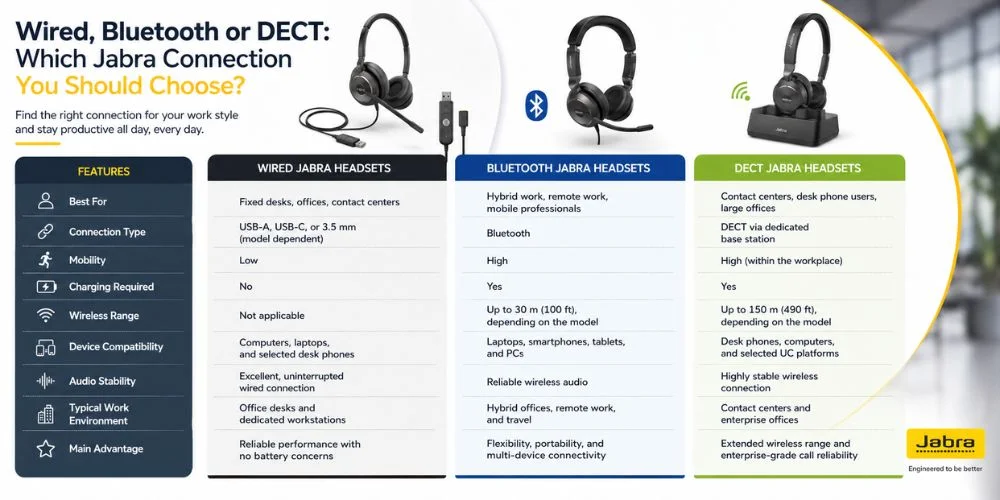
Wired, Bluetooth or DECT: Which Jabra Connection You Should Choose?
If you want the right connection type, you need to consider factors like the devices you use and your mobility throughout the day. Jabra offers all available connection options to meet the different needs of different users. This comparison table below focuses on the strengths of each connection type to help you understand what suits your workspace.
| Features | Wired Jabra Headsets | Bluetooth Jabra Headsets | DECT Jabra Headsets |
|---|---|---|---|
| Best For | Fixed desks, offices, contact centres | Hybrid work, remote work, mobile professionals | Contact centres, desk phone users, large offices |
| Connection Type | USB-A, USB-C or wired connection | Bluetooth | DECT via dedicated base station |
| Mobility | Low | High | High (within workplace space) |
| Charging Required | No | Yes | Yes |
| Wireless Range | Not applicable | Short to medium range (up to 30m/100ft) depend on model | Long range (up to 150m / 490ft), model dependent |
| Device Compatibility | Computers, selected desk phones | Laptops, smartphones, tablets | Desk phones, computers, selected UC platforms |
| Audio Stability | Excellent, uninterrupted wired connection | Reliable wireless connection | Highly stable wireless connection |
| Typical work environment | Office Desk | Hybrid office, travel | Customer Service centres |
| Main Advantage | Reliable performance with no battery concerns | Flexibility and portability | Extended wireless range and enterprise-grade call reliability |
Which Jabra Features Matter Most?
Microphone Noise Reduction
When you are on an important call with a client, the last thing you want to be transmitting through the line is the clatter of a busy office or background gossip. Microphone noise reduction uses smart internal processing to filter out those annoying background sounds. This buying factor has a crucial impact for remote workers or open office employees. Many headsets such as Jabra Evolve2 85 use multiple microphones to enhance the speaker’s voice while reducing unwanted surrounding sounds.
Active Voice Cancellation
Active noise cancellation ANC works entirely differently from microphone processing because it is built for the wearer. Instead of cleaning up what people hear on the other end, ANC actively reduces surrounding room hum and low-frequency distractions right at your ears. The buying impact here is improved personal focus and reduced listening fatigue. Premium Jabra Evolve2 75 models have an advanced microphone array and beamforming technology that further enhance voice pickup.
Battery Life and Wireless Range
You need to compare official specifications directly against your real shift length, daily call volume and how much you really walk around your workspace. Jabra Bluetooth models typically give enough battery life to support whole-day work. DECT headsets like Jabra Engage 55 Stereo and Jabra Engage 55 Mono are designed for extended use and offer a greater wireless range than a standard Bluetooth connection.
Mono and Stereo
Choosing between single-ear (mono) and dual-ear (stereo) design comes down to how much you need to stay connected to your surroundings. Jabra Engage 65 Mono and Jabra Engage 65 Stereo features a single earpiece, leaving your other ear free to listen to your colleagues or others near you. Jabra Bizz 2400 || Duo and Jabra Biz 2400 II Mono covers both ears and gives you full acoustic immersion that cuts out ambient distractions.
On Ear and Over Ear
The physical cushion style of your headset dictates your daily comfort over long hours of continuous wear. Jabra Evolve 65 TE Stereo and Jabra Evolve 65 TE Mono an on-ear model rests gently directly on top of your outer ears, offering you a lightweight and easy to take on and take off throughout the day. Jabra Evolve2 85 over-ear model features larger ear cups that completely enclose your ears, distributing pressure evenly around the ear rather than on it.
Busy Light and Call Controls
LED indicators notify your colleagues or people around you when you are on a call, and a physical button lets you adjust the volume, mute and end the call easily. Jabra Engage 75 SE makes your use hassle-free and gives you easy operating options.
USB-A, USB-C and Jabra Link Adapters
Jabra Evolve2 65 Stereo or Jabra Evolve2 65 Mono and many other headsets let you match your laptop ports by choosing direct connection or wireless USB adapters. Wireless models often include a Jabra Link Bluetooth Adapter which gives a more stable connection than device-built-in Bluetooth.
Which platforms and Devices Work with Jabra?
Jabra headsets are designed to work with a wide range of devices and platforms, making them the first choice for the modern workspace. The section below provides a general compatibility overview.
| Device or platform | Typical Compatibility | Connection Type | Notes |
|---|---|---|---|
| Windows Pc | Supported | USB-A, USB-C, Bluetooth, Jabra Link Adapter | Compatible with most Jabra business headsets. Supports Jabra Direct firmware updates and device management. |
| Mac Computers | Supported | USB-A, USB-C, Bluetooth | Works with macOS for calls, meetings and multimedia. |
| Android Smartphones | Supported | Bluetooth | Most Bluetooth-enabled Jabra headsets support Smartphones. |
| iPhone and iPad | Supported | Bluetooth | Compatible with iOS devices for calls, meetings and music playback. |
| Desk Phones | Model Dependent | USB, RJ9, QD, EHS cable, Adapter | Compatibility depends on phone model and may require an EHS cable or adapter. |
| Microsoft Teams | Supported | USB, Bluetooth | Team certified models provide dedicated team control and optimised call handling. |
| Zoom | Supported | USB, Bluetooth | Many Jabra headsets are Zoom certified for a seamless meeting experience. |
| Google Meet | Supported | USB, Bluetooth | Compatible with Google Meet on supported devices. |
| Cisco Webex | Supported | USB, Bluetooth | UC certified models provide reliable performance with Webex. |
| Cisco Desk phones | Model Dependent | USB, RJ9, EHS cable | Some Cisco phones require compatible adapters or EHS cables. |
| Avaya Phones | Model Dependent | USB, RJ9, EHS cable | Adapter requirement varies on Avaya phone system. |
| Softphones and UC platforms | Supported | USB, Bluetooth | Compatible with platforms like RingCentral, 8X8, Mitel, Genesys. |
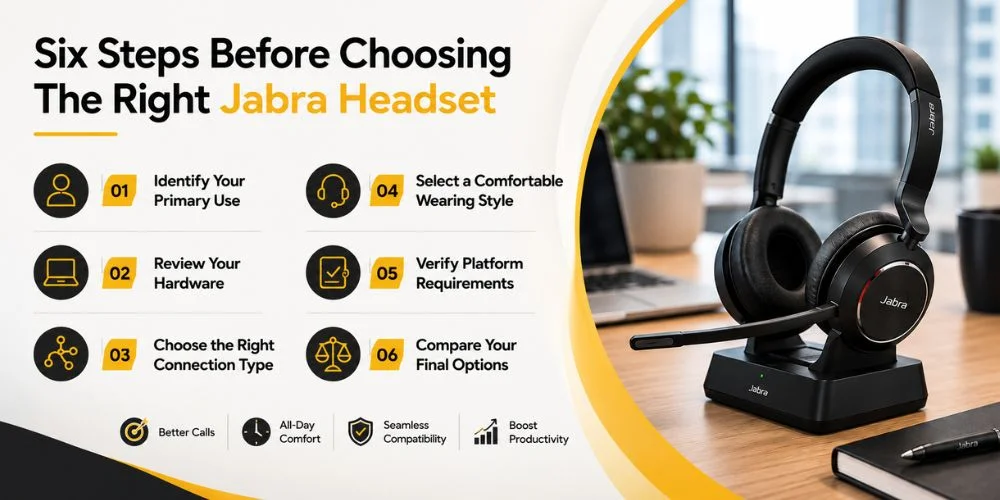
Six Steps Before Choosing The Right Jabra Headset
Choosing the right professional headset does not need to be overwhelming. After spending enough time going through the feature lists, specs and more series only to end up with the wrong purchase. We have broken down the selection process into six simple and practical steps. It helps you save time, money and unnecessary fatigue.
Identify Your Primary Use
Pinpoint whether your day consists of virtual meetings, customer support calls, desk telephony or mobile work. Understanding your core activity ensures you invest in hardware built for that specific environment. It prevents you from issues like fatigue during long calls or poor performance.
Review Your Hardware
Take note of the physical devices you interact with daily. Your laptops, desktops, mobile phones and office desk phones. Check your available ports (such as USB-A versus USB-C) and system configuration to avoid connectivity mismatches before purchases.
Choose the Right Connection Type
Match your preferred wired, Bluetooth or DECT connection to your need for mobility, desk setup and charging preferences. This ensures you get consistent audio and microphone performance or the wireless freedom required for you.
Select a Comfortable Wearing Style
Balance your comfort and environmental awareness by selecting mono, stereo, on-ear or over-ear configurations. Your choice should reflect whether you need to stay alert to office surroundings or require complete acoustic immersion.
Verify Platform Requirements
Check your software dependencies like Microsoft Teams, Zoom, standard softphones and specific phone systems. Ensuring compatibility guarantees that your call controls, software integration and application shortcuts function seamlessly.
Compare Your Final Options
Narrow your options down to two to three suitable models and thoroughly compare their individual product specifications. Reviewing the category page helps you weigh final features against your budget and workflow needs.
How to Set Up and Update Jabra Headset With Jabra Direct
Once you receive your headset, plug it into your desired device: laptop or desk phone. Ensure your system recognises it as the default input and output audio device.
To get the maximum benefit from your device, download and install Jabra Direct on your computer. This essential software suite allows you to keep your hardware secure and bug-free. Check out our step-by-step guidance on specific configurations for a deeper guide:
- How to Set up and Update a headset with Jabra Direct
- How to Connect a Jabra Headset to a Windows PC or Mac
- How to Connect a Jabra Headset to a Desk Phone
- How to Pair a Jabra Headset with Two Devices
Quick Jabra Headset Troubleshooting Guide
Microphone not Working: If your microphone is not working, make sure the headset microphone is not muted. Review your app permissions and install any available firmware update.
Connection Problem: Reconnect your Bluetooth if needed, make sure your wireless USB adapter is connected properly and confirm your default system audio settings.
Microsoft Teams Issues: Confirm that the correct audio device is selected in Microsoft Teams. Make sure you are using a certified Microsoft Teams model, and keep both your Teams and firmware up to date.
Frequent Disconnections: See your headset battery level, reduce the interference from nearby Bluetooth sources. If possible place your USB adapter near your headset and update firmware if available.
Charging Issues: Check your charging cable, dock and charging stand for damage. Try another USB source and make sure the charging contacts are clean.
Your Trusted Partner for Jabra Headphone
If you are looking for an advanced and reliable Jabra Headset, you are on the right platform. FindHeadsets is your premier online supplier and offers the complete line of all Jabra Headset Products. At FindHeadsets, we give you an easy 30-day return policy if you are not satisfied with your purchase. We offer fast shipping and easy payment methods. With our 24/7 customer support, we are here for you all the time. Explore our collection and place your order now!
Frequently Asked Questions
Which Jabra headset is best for the office?
The Jabra Evolve2 and Evolve3 lines are ideal for office environments. Noise suppression with comfortable wearing styles built for all day virtual meetings.
What is the difference between Jabra Evolve and Engage?
The Jabra Evolve Series is designed as a flexible hybrid and office solution. It is optimised for multitasking, music and multi device connections. The Jabra Engage family is engineered specifically for heave calls customer support professionals who need good DECT range and voice clarity.
What should I use: a Wireless or Wired Headset?
Wired models offer an easy plug and remove feature with zero battery anxiety and are ideal for fixed desks. Wireless Bluetooth or DECT headsets provide the freedom to move around and switch between computers and mobile phones.
What is the difference between Jabra MS and UC?
MS variants are certified for Microsoft Teams and feature dedicated hardware buttons for instant app access and meeting controls. UC variants are universal versions configured to run smoothly across alternative platforms like Zoom, Google Meet and Cisco Webex.
Can a Jabra headset connect ot multiple devices?
Yes. Many Jabra models support multiple device pairing. It allows you to handle calls from either source without switching the connection.
Are Jabra headsets suitable for noisy offices?
Yes. Higher end models feature active noise cancellation (ANC) to block unnecessary background sounds.
Which Jabra headset works with a desk phone?
The Jabra Engage Series offers robust desk phone compatibility through dedicated base stations, EHS or Bluetooth adapters.
How do I update a Jabra headset?
You can update your headset’s firmware by downloading the free Jabra Direct software onto your Windows PC or Mac, connecting your device and following on screen instructions.
No comments yet. Be the first to comment!
Leave a ReplyYour email address will not be published. Required fields are marked *