
Jabra Sidetone can be the feature you are looking to use if you have ever been on a long call wearing a headset and felt that you could not hear your own voice.
The sidetone gives you the capability of hearing a bit of your voice through the headset as you talk. This can assist you in managing your talking tone and make it easier to talk to people.
For users who invest hours in Microsoft Teams meetings, customer calls, or any other online interactions, sidetone can enhance the comfort of daily life. But the control of the feature varies depending on which Jabra headset you have, how you are connected, and which software is supported.
This guide will teach you what Jabra Sidetone is, how it works, why it is useful, how to adjust it, how to turn it off and what to do in case it is not working.
What Is Jabra Sidetone?
Jabra Sidetone is an option that allows you to listen to yourself as you speak.
A little of this audio is also played back through the headset speakers when the headset microphone picks up your voice. You are then able to hear yourself as the call proceeds as usual.
This is not to play your voice over and over again. Rather, sidetone offers a moderate amount of voice feedback in order to make you conscious of the volume at which you are speaking.
This may prove useful especially when you are in a noisy environment and have your headset on or when you are in a quiet place.
Why Do Headsets Use Sidetone?
Some users of headsets might feel out of touch with the world without the use of sidetone. Since they have covered ears and the exterior sound can be minimized, they might naturally begin to speak louder.
Sidetone allows you to have some idea of what your voice sounds like without the need to take off the headset.
This can make long calls easier and can assist you in speaking at a natural level. It is particularly handy with office employees, remote workers, customer service staff, and people who spend most of the day on the phone.
How Does Sidetone Work?
Sidetone takes advantage of the headset microphone to record your voice and sends a little of that signal back into the headset.
This process occurs fast enough that you usually hear yourself as you speak as opposed to having to hear yourself after you have spoken.
The other individuals do not normally hear a second version of your voice just because the sidetone is on. The feature is primarily created to alter what you listen to using your headset.
The exact implementation can vary between Jabra models.
What Are the Benefits of Sidetone?
Sidetone might appear to be a minor option, but it can be helpful in daily calls.
Helps Control Your Speaking Volume
You can more easily realize that you are speaking too loudly than you have to because you can hear yourself.
Makes Calls Feel More Natural
Listening to a little of your own voice can help lessen the alienation that can arise when using a headset.
Improves Comfort During Long Calls
When you spend hours in meetings or making calls, the ability to hear yourself can make the headset feel more comfortable to use.
Useful in Quiet Workspaces
Sidetone can also be used in a home office or a common workplace to ensure that you do not speak too loudly.
Helps With Consistent Communication
For individuals who spend the majority of their workday talking to customers or colleagues, it is possible to talk at a comfortable level of speaking, which makes dialogue easier.
What to Look for in a Jabra Headset for Calls
Should you value sidetone, find out first whether the specific Jabra model you want to use supports it and whether you can regulate the level. Next consider other options that influence your daily calls including the quality of the microphone, clarity of the calls, comfort, connectivity and noise cancellation.
It also depends on your work arrangement. A wired headset is a straightforward option when you primarily sit at the computer, whereas a wireless one might be more appropriate when you have to move around as you talk. When using a computer and phone, ensure that the device connectivity and compatibility you require are available.
In busy offices, it can be useful to reduce noise with a microphone. Comfort and battery life can be as crucial as audio features in case of long meetings.
The most suitable is the one that offers the sidetone controls, call features, connectivity, and comfort that suit your everyday work instead of just having the most features.
What Is the Difference Between Sidetone and Noise Cancellation?
The purposes of sidetone and noise cancellation are different.
Sidetone allows hearing of your voice. It gives voice awareness as you speak.
Noise cancellation minimizes undesired sound. This may consist of sounds that are going on in the background or sounds that you do not want to be heard by the microphone, depending on the headset.
To illustrate, a Jabra headset can employ noise reduction on the microphone to enable the individual on the other end to hear you better and sidetone enables you to hear yourself.
These characteristics can thus complement each other and not substitute one another.
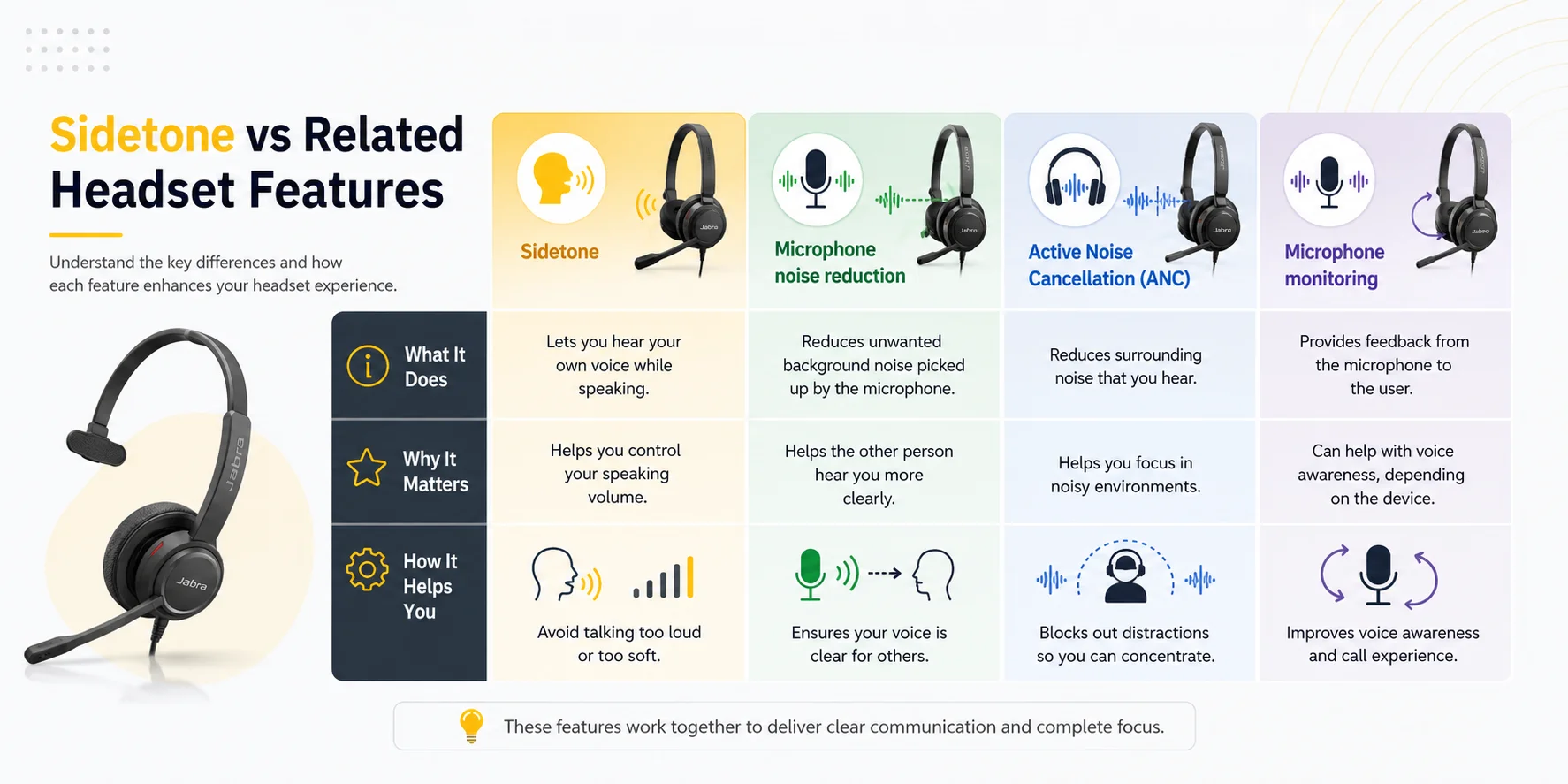
Sidetone vs Related Headset Features
| Feature | What It Does | Why It Matters |
|---|---|---|
| Sidetone | Lets you hear your own voice while speaking | Helps you control your speaking volume |
| Microphone noise reduction | Reduces unwanted background noise picked up by the microphone | Helps the other person hear you more clearly |
| Active Noise Cancellation (ANC) | Reduces surrounding noise that you hear | Helps you focus in noisy environments |
| Microphone monitoring | Provides feedback from the microphone to the user | Can help with voice awareness, depending on the device |
Does Sidetone Affect What the Other Person Hears?
Sidetone is usually designed to influence the sound you can listen to with your own headset.
It is not to be confused with microphone monitoring which transmits an unprocessed version of your microphone signal to the other participant. Sidetone is intended to give you voice feedback as you speak.
In case someone complains that your voice sounds unclear, noisy and distorted, a sidetone change is not likely to resolve the situation. Instead, you ought to examine the microphone, connection, software, and noise around.
How to Adjust Jabra Sidetone
To adjust Jabra Sidetone, firstly, connect your compatible Jabra headset to your computer and start Jabra Direct assuming that your model has sidetone settings in Jabra Direct. Choose your headset and verify the available audio or call options for sidetone. When the setting is present, you can regulate the level to ensure your own voice is either lower or more prominent during calls.
Begin with a low or medium level and experiment with it during a normal call. Your voice should not be too loud to manipulate the volume of your voice, but it also should not be so distracting.
The specific procedure and the controls that are available will depend on the Jabra model. Not all Jabra headsets have the same sidetone settings, and therefore, if you do not find it, refer to the user manual or specifications of your particular model. Do not think that the setting is not shown because the feature is faulty.
Adjust Jabra Sidetone Using Jabra Direct
With your headset being able to use the Jabra Direct Sidetone, it is typically easy. Plug in the headset into your computer, open Jabra Direct and choose the connected headset. Check the audio, call or headset options available to find sidetone options.
Where there is a choice, raise or lower the level, depending on the degree of your own voice that you wish to hear. Once the change has been made, test the headset during a call to ensure that the setting is comfortable.
What If You Cannot Find the Sidetone Setting?
In case Jabra Direct does not have a sidetone option, refer to the documentation of your particular headset. Jabra models differ in the features of sidetone support and adjustment, and not all connection methods may support certain features.
It is also important to ensure you have the right headset chosen in the software and the device is correctly connected. Check supported software or firmware updates, as necessary.
Briefly, plug in your compatible Jabra headset, open Jabra Direct, find the device in the list, find the sidetone option and change the level to the desired volume. In the event that the option is not provided, make sure that your specific model has the features that it is supported on before going further with troubleshooting.
How to Turn Jabra Sidetone On or Off
If your headset has an adjustable sidetone, you can control the option with its available options.
Install the compatible Jabra program once the headset is connected and look for the sidetone option. When the control is present, you can either turn on the feature or set it to the minimum possible.
Others use sidetone as it enables them to manage the volume of their speech. Other people like greater distance and might consider their own voice distracting.
There is no universal setting that is right for everyone.
What Is the Best Sidetone Level?
The optimum level of sidetone relies on your surroundings and taste.
When you are in a very quiet home office, a low level can suffice to help you be mindful of your voice. When you have to work in a noisy place or you have a headset that suppresses the sound around to a great extent, you might want a slightly higher level.
An excellent place to start is a low or moderate environment.
Your voice should be noticeable without having to pay attention to it. When your own voice is distracting in a meeting, turn down the volume.
Why Can't I Hear My Own Voice on My Jabra Headset?
In case you are unable to hear yourself, there are a number of things to check.
First, make sure that your particular model of Jabra has sidetone. Not all headsets offer identical sidetone functionality and adjustments.
Secondly, verify the settings of the headset using supported Jabra software. When using Jabra Direct, ensure that you are wearing the proper headset and have selected it.
You are also to check the physical or wireless connection. Some of the configuration features might not work as intended in case the headset is not correctly connected.
In case the feature used to work but is no longer working, reconnecting the headset and making sure that there is a software or firmware update available can also help.
Why Is Jabra Sidetone Too Loud?
If you can hear your voice too much, the sidetone level might be just too high.
In places where adjustment is possible, lower the level using the settings of the headset.
In the event that the issue persists, then consider whether a different audio option or application is influencing how you hear your voice.
It should not be heard as much as the person on the call. Sidetone must be unobtrusive in general.
Why Is Jabra Sidetone Too Quiet?
In case the sidetone is on and hard to hear, it might be because the sidetone level is not available on your headset.
Gradually raise the level when your model accommodates it. It should not be set too high since it is meant to give you an awareness, not to have your own voice as the primary sound that is heard.
In case no adjustment can be made, your model might make use of a constant sidetone level.
Can Sidetone Stop Working After Connecting to Another Device?
Yes, the connection method can be reliant on the available behavior.
The Jabra headset can be used with a computer, smartphone, desk phone, USB adapter, or any other compatible device. Each connection has features and controls that may vary.
In case sidetone is compatible with one system and not with another, consult the compatibility details of your specific model and connection type.
This is especially crucial in professional settings where the same headset can be used both with a computer and a desk phone.
Does Jabra Sidetone Work With Microsoft Teams?
Microsoft Teams are generally used with Jabra headsets, but sidetone behavior varies depending on the headset and connection.
In case you make the majority of your calls via Teams, make sure that the Jabra headphone you have is compatible with your Teams environment and that the connection method you need is supported.
Sidetone is typically a headset level feature, and Teams takes care of the call itself. Thus, adjusting a Teams audio setting may not offer the same level of control as adjusting the headset itself sidetone setting.
Which Jabra Headsets Are Good for Professional Calls?
The most appropriate Jabra headset will depend on the place where you work and its application.
A wired version like the Jabra Evolve2 30 SE Stereo would be useful to people who spend most of their time at a computer and require a simple professional headset to use in meetings and calls. Its stereo feature may also come in handy whenever you would prefer to listen to audio when you are working.
The Jabra Engage 65 Mono SE is a better type of headset to use when the user requires wireless freedom and the ability to make professional calls. Its professional design is designed to be used by people who have to spend a lot of time on calls, and may have to move around during work.
These are also examples that demonstrate why sidetone is not the only feature that you want to compare. It can be connected, have a good microphone, wear well, have a long range, last long, and be compatible.
What Other Features Should You Compare?
When selecting a Jabra headset to work with, it is recommended to look at the entire feature set as opposed to sidetone.
The quality of the microphones is important when you have to talk to customers or co-workers most of the day. A quality microphone must offer a good transmission of voice and help to minimize the undesirable background noise.
Connectivity is significant when you alternate between computers, smartphones, desk phones or communication platforms.
Battery life is important to wireless users, particularly when you are working long shifts or have back-to-back meetings.
The range of wireless can also be more crucial when you have to walk out of your desk and still be connected.
Wearing style and comfort should also be taken into consideration should you have to use the headset several hours a day.
Common Jabra Sidetone Problems and Solutions
Cannot Find the Sidetone Setting
Look at the specs and user manual of your particular Jabra model. Not all the devices have the same control over the feature.
My Voice Sounds Too Loud
Reduce the level of sidetone when possible on your headset.
Cannot Hear Myself at All
Ensure that sidetone is turned on and supported. Next, verify the headset connection and Jabra software settings.
Sidetone Works on My Computer but Not Another Device
Make sure that the second device and connection method have the same headset controls.
Sidetone Is Distracting During Calls
Minimize the degree or disable the feature in case your model permits it. Sidetone is not to distract you, but to make you comfortable.
My Caller Says My Voice Sounds Bad
It is unlikely that sidetone is the cause. Instead, check microphone placement, background noise, quality of the connection and calling application.
Find the Right Jabra Headset for Your Calls
At Find Headsets, we are of the opinion that a good headset must suit your working style and not necessarily appear well in a product specification list. In selecting a Jabra headset, we suggest considering the entire picture, such as sidetone, quality of microphone, comfort, connectivity, battery life, wireless range, and compatibility with devices.
Consider the way you wear your headset on a daily basis. When you use online meetings most of the time, comfort and clarity in the microphone can be of the greatest importance. Wireless range and battery life are more important when you move around your workplace. When changing devices, ensure that the headset can be used with the connections you require.
We also suggest checking the specifications of the exact model before purchasing it, since the features and controls of the Jabra headsets may differ depending on the set of headsets.
We just want to get you to pick a headset that is comfortable to use during your actual working day and not necessarily the one that has the most features on its list.
Need Help Choosing the Right Jabra Headset?
In case you are confused about the type of Jabra headset that suits your installation, first compare your daily call duration, devices, workspace, connectivity requirements and wearing style. Such information will reduce the correct choice significantly.
Final Verdict: Is Jabra Sidetone Worth Using?
The Jabra Sidetone is a handy feature that can be useful to those who make many calls since you can hear your voice and have a natural speaking tone. It can enhance comfort in a long meeting and reduce the feeling of isolation in headset conversations.
Depending on the model of Jabra, the specific sidetone controls are different, and you should see what settings are supported in your headset before attempting to fine-tune the feature. When sidetone is a factor in your everyday calls, weigh it with microphone quality, connectivity, comfort, battery life, wireless range, and compatibility.
The right Jabra headset must not only make you comfortable when hearing yourself, but it must also offer the performance and features you require during your working day.
Frequently Asked Questions
What is Jabra sidetone?
Jabra sidetone allows you to hear some of your own voice through the headset when speaking. It will assist you in regulating your tone of voice and make calling more natural.
How do I adjust Jabra sidetone?
If your model has the sidetone adjustment option, plug in the headset into a compatible device and verify its supported Jabra software settings. Jabra Direct can offer controls on compatible headsets.
Can I turn Jabra sidetone off?
You can disable or minimize sidetone on supported models using the headset settings. The controls available are based on the model.
Why can I not hear myself on my Jabra headset?
Ensure that your headset has sidetone and is switched on. Then verify the headset connection and configuration settings.
Is sidetone the same as noise cancellation?
No. Sidetone enables you to listen to your voice, whereas noise cancellation is meant to minimize undesired surrounding or background noise.
Does sidetone improve microphone quality?
No. Sidetone is primarily an influence on hearing. The quality of microphones is determined by the microphone, connection, audio processing, and the environment you are in.
Does Jabra sidetone work with Teams?
It is possible, depending on the Jabra model and connection method. Verify the compatibility and features supported by the headset with your Teams configuration.
Should I use a high sidetone level?
Typically, the low or medium level suffices. You ought to hear yourself without being distracted by your voice.
Is sidetone useful for long calls?
Yes. Listening to your voice makes long headset calls more natural and can prevent you from talking louder than you need to.
No comments yet. Be the first to comment!
Leave a ReplyYour email address will not be published. Required fields are marked *